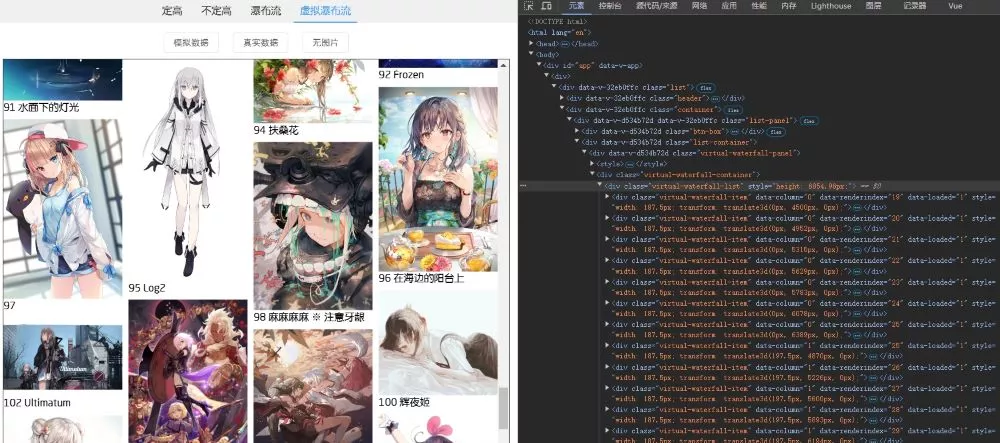
前言
将大量DOM元素直接渲染到页面性能是很差的,存在的问题:
- 大量DOM元素重绘,CPU开销大,滚动卡顿。
- GPU渲染能力不够,跳屏。
- 页面等待、布局时间长,白屏问题。
- 大量DOM元素内存占用大。
传统的做法是随着滚动增量渲染,堆积的DOM元素也会越来越多,会出现同样的性能问题。
虚拟列表的核心思想是动态计算、按需渲染,是一种根据滚动容器元素的可视区域来渲染长列表数据中部分数据的技术。 在线感受虚拟列表的魅力:virtual-list-demo
虚拟列表可以简单分为以下几类:
- 定高:每个DOM元素高度确定
- 不定高:每个DOM元素高度不确定
- 瀑布流:例如小红书首页,是普通瀑布流的优化,也属于不定高类型。
原生JS定高
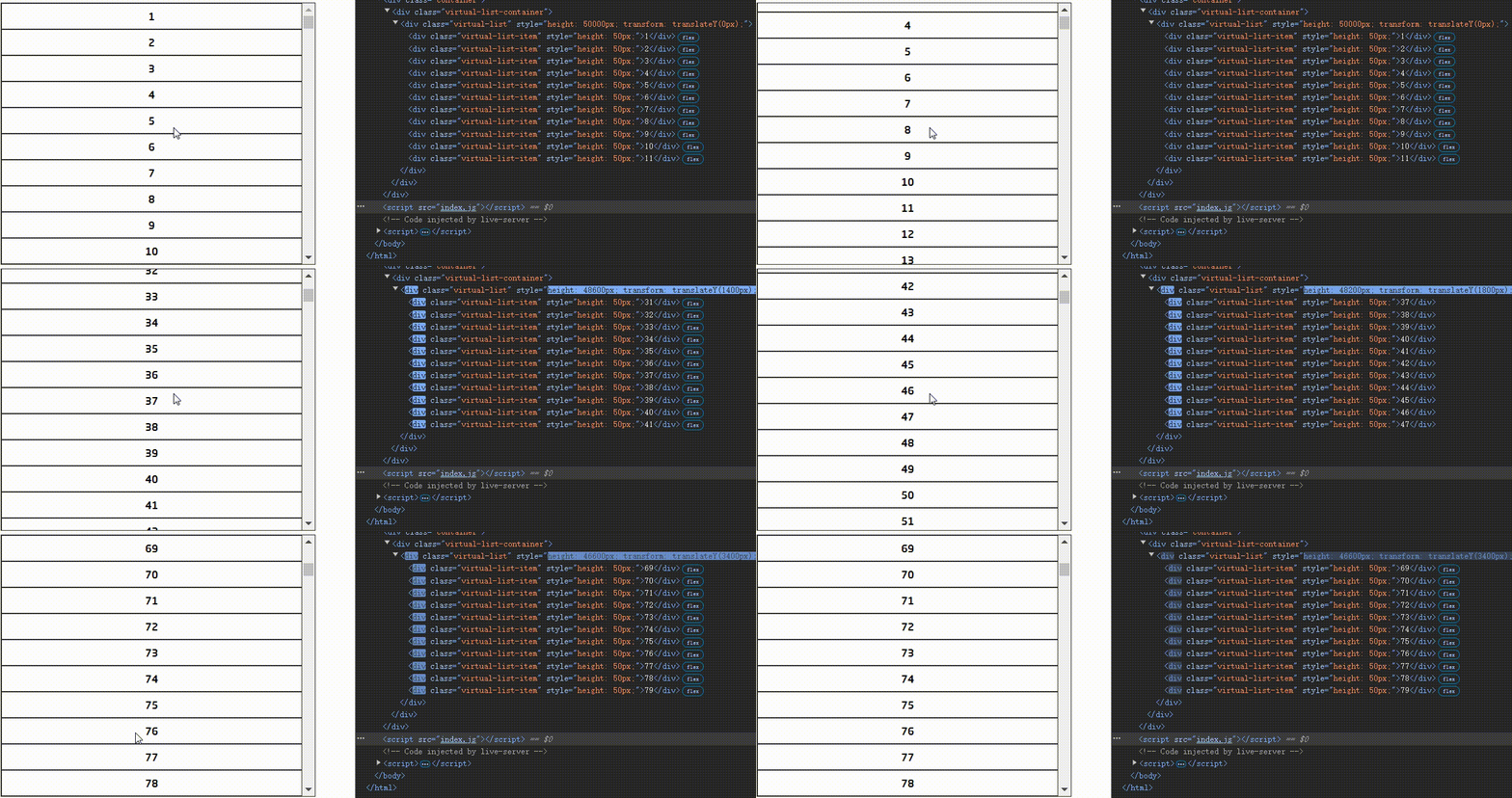
定高的原理比较简单,也是其它虚拟列表的基础,这里使用原生JS实现。
这是预期的DOM结构:
<!-- 虚拟列表容器 --><div class="virtual-list-container"> <!-- 虚拟列表 --> <div class="virtual-list"> <!-- 动态渲染的虚拟列表项 --> <div class="virtual-list-item">1</div> </div></div>virtual-list-container 外层的滚动容器元素,由它确定可视区域。
virtual-list 实际列表容器,撑起滚动高度。
virtual-list-item 动态渲染的虚拟列表项。
撑起滚动高度
由于是动态渲染,滚动高度不能再由列表项元素撑起,为了维持正常的滚动条,需要如下技巧。
在滚动过程中,对 virtual-list 设置 transform: translateY() 撑起卷去高度(滚动的偏移量),模拟滚动效果,再设置 height 为初始列表高度减去滚动的偏移量。
基本数据结构
基本的数据结构:封装 virtualList 类方便调用。
class virtualList { constructor(el, itemHeight) { this.state = { data: [], // 数据 itemHeight: itemHeight || 100, // 每一项的高度,固定 viewHeight: 0, // 整个列表可视区域的高度 renderCount: 0, // 渲染的项数 }; this.startIndex = 0; // 开始渲染的索引 this.endIndex = 0; // 结束渲染的索引 this.renderList = []; // 实际渲染列表 this.scrollStyle = { height: "0px", transform: "translateY(0px)", }; // 滚动样式,用于设置列表的偏移量,实现滚动效果 this.el = document.querySelector(el); // 挂载元素 this.init(); }}state 是一些基本数据,包括列表数据、每一项高度、可视区域高度、渲染项数。
根据滚动状态计算 startIndex、endIndex,由这两者确定 renderList 实际渲染的列表数据,以及 scrollStyle 虚拟滚动样式。
挂载
mount() 创建虚拟列表预期的DOM结构,并挂载到指定元素上。
mount() { // 创建虚拟列表容器 this.oContainer = document.createElement("div"); this.oContainer.className = "virtual-list-container"; // 创建虚拟列表 this.oList = document.createElement("div"); this.oList.className = "virtual-list"; // 设置子元素 this.oContainer.appendChild(this.oList); // 挂载到页面 this.el.innerHTML = ""; this.el.appendChild(this.oContainer);}初始化
init() 进行必要的初始化,进行挂载、计算基本数据、绑定事件(主要是滚动事件),当然还需要进行一次初始渲染。
init() { this.mount(); // 计算列表可视区域的高度 this.state.viewHeight = this.oContainer.offsetHeight; // 计算渲染的项数,向上取整,多渲染一项,避免滚动时出现空白 this.state.renderCount = Math.ceil(this.state.viewHeight / this.state.itemHeight) + 1; this.render(); // 进行一次渲染 this.bindEvent(); // 绑定事件,如滚动事件}offsetHeight 只读属性,它返回该元素的像素高度,高度包含该元素的垂直内边距、边框和滚动条,且是一个整数。使用它作为可视区域的高度正合适。
计算 renderCount 时需要至少多渲染一项,避免滚动时出现空白。
渲染数据
render() 进行一些必要的计算后,渲染出列表子项,并设置虚拟滚动样式。
render() { // 进行必要的计算 this.computeEndIndex(); this.computeRenderList(); this.computeScrollStyle(); // 列表子项 const items = this.renderList.map((item) => { return `<div class="virtual-list-item" style="height: ${this.state.itemHeight}px;">${item}</div>`; }); const template = items.join(""); this.oList.innerHTML = template; // 设置滚动样式 this.oList.style.height = this.scrollStyle.height; this.oList.style.transform = this.scrollStyle.transform;}一些计算
每次渲染前需要计算必要的数据,包括末索引、渲染列表、滚动样式。
computeEndIndex() { this.endIndex = this.startIndex + this.state.renderCount - 1; // 如果结束索引大于数据长度,结束索引等于数据长度 if (this.endIndex > this.state.data.length - 1) { this.endIndex = this.state.data.length - 1; }}computeRenderList() { // 截取数据,slice方法是左闭右开区间,所以结束索引要加1 this.renderList = this.state.data.slice(this.startIndex, this.endIndex + 1);}computeScrollStyle() { // 计算滚动的偏移量 const scrollTop = this.startIndex * this.state.itemHeight; // 始终保证height+transformY=列表总高度,也就是this.state.data.length * this.state.itemHeight this.scrollStyle = { // 设置列表的高度,减去滚动的偏移量 height: `${this.state.data.length * this.state.itemHeight - scrollTop}px`, // 设置列表的偏移量,通过transform实现滚动效果 transform: `translateY(${scrollTop}px)`, };}绑定事件
绑定滚动事件,注意要将滚动回调的this绑定到当前类实例。
bindEvent() { // 注意将handleScroll的this绑定为当前实例 const handle = this.rafThrottle(this.handleScroll.bind(this)); this.oContainer.addEventListener("scroll", handle);}滚动回调: 在滚动过程中计算起始索引,即将 scrollTop (卷去高度)除以每项高度,并向下取整。还需要调用渲染函数,不断渲染最新DOM元素。
handleScroll() { // 计算开始渲染的索引 this.startIndex = Math.floor( this.oContainer.scrollTop / this.state.itemHeight ); // 渲染列表 this.render();}完整代码
<!DOCTYPE html><html lang="en">
<head>  <meta charset="UTF-8">  <meta name="viewport" content="width=device-width, initial-scale=1.0">  <title>原生JS固高虚拟列表</title>  <style>    .container {      width: 600px;      height: 500px;      border: 1px solid #333;      margin: 150px auto;    }
    .virtual-list-container {      width: 100%;      height: 100%;      overflow: auto;    }
    .virtual-list {      width: 100%;      height: 100%;    }
    .virtual-list-item {      width: 100%;      /* 固定高度 */      display: flex;      justify-content: center;      align-items: center;      border: 1px solid #333;      box-sizing: border-box;      text-align: center;      font-size: 20px;      font-weight: bold;    }  </style></head>
<body>  <div class="container"></div>  <script src="index.js"></script></body>
</html>
// <!-- 虚拟列表容器 -->// <div class="virtual-list-container">// <!-- 虚拟列表 -->// <div class="virtual-list">// <!-- 动态渲染的虚拟列表项 -->// <div class="virtual-list-item">1</div>// </div>// </div>class virtualList { constructor(el, itemHeight) { this.state = { data: [], // 数据 itemHeight: itemHeight || 100, // 每一项的高度,固定 viewHeight: 0, // 整个列表可视区域的高度 renderCount: 0, // 渲染的项数 }; this.startIndex = 0; // 开始渲染的索引 this.endIndex = 0; // 结束渲染的索引 this.renderList = []; // 实际渲染列表 this.scrollStyle = { height: "0px", transform: "translateY(0px)", }; // 滚动样式,用于设置列表的偏移量,实现滚动效果 this.el = document.querySelector(el); // 挂载元素 this.init(); } // 初始化 init() { this.mount(); // 计算列表可视区域的高度 this.state.viewHeight = this.oContainer.offsetHeight; // 计算渲染的项数,向上取整,多渲染一项,避免滚动时出现空白 this.state.renderCount = Math.ceil(this.state.viewHeight / this.state.itemHeight) + 1; this.render(); // 进行一次渲染 this.bindEvent(); // 绑定事件,如滚动事件 } // 创建并挂载dom元素 mount() { // 创建虚拟列表容器 this.oContainer = document.createElement("div"); this.oContainer.className = "virtual-list-container"; // 创建虚拟列表 this.oList = document.createElement("div"); this.oList.className = "virtual-list"; // 设置子元素 this.oContainer.appendChild(this.oList); // 挂载到页面 this.el.innerHTML = ""; this.el.appendChild(this.oContainer); } // 计算结束渲染的索引 computeEndIndex() { this.endIndex = this.startIndex + this.state.renderCount - 1; // 如果结束索引大于数据长度,结束索引等于数据长度 if (this.endIndex > this.state.data.length - 1) { this.endIndex = this.state.data.length - 1; } } // 计算渲染的列表 computeRenderList() { // 截取数据,slice方法是左闭右开区间,所以结束索引要加1 this.renderList = this.state.data.slice(this.startIndex, this.endIndex + 1); } // 计算虚拟滚动样式 computeScrollStyle() { // 计算滚动的偏移量 const scrollTop = this.startIndex * this.state.itemHeight; // 始终保证height+transformY=列表总高度,也就是this.state.data.length * this.state.itemHeight this.scrollStyle = { // 设置列表的高度,减去滚动的偏移量 height: `${this.state.data.length * this.state.itemHeight - scrollTop}px`, // 设置列表的偏移量,通过transform实现滚动效果 transform: `translateY(${scrollTop}px)`, }; } // 渲染列表 render() { // 进行必要的计算 this.computeEndIndex(); this.computeRenderList(); this.computeScrollStyle(); // 列表子项 const items = this.renderList.map((item) => { return `<div class="virtual-list-item" style="height: ${this.state.itemHeight}px;">${item}</div>`; }); const template = items.join(""); this.oList.innerHTML = template; // 设置滚动样式 this.oList.style.height = this.scrollStyle.height; this.oList.style.transform = this.scrollStyle.transform; } // 节流 throttle(fn, delay = 50) { let lastTime = 0; return function () { const now = Date.now(); if (now - lastTime > delay) { fn.apply(this, arguments); lastTime = now; } }; } // 使用requestAnimationFrame实现节流 // requestAnimationFrame会在浏览器下一次重绘之前执行回调函数 rafThrottle(fn) { let ticking = false; return function () { if (ticking) return; ticking = true; window.requestAnimationFrame(() => { fn.apply(this, arguments); ticking = false; }); }; } // 滚动事件处理函数 handleScroll() { // 计算开始渲染的索引 this.startIndex = Math.floor( this.oContainer.scrollTop / this.state.itemHeight ); // 渲染列表 this.render(); } // 绑定事件 bindEvent() { // 注意将handleScroll的this绑定为当前实例 // const handle = this.throttle(this.handleScroll.bind(this)); const handle = this.rafThrottle(this.handleScroll.bind(this)); this.oContainer.addEventListener("scroll", handle); } // 设置数据 setData(data) { this.state.data = data; this.render(); }}const list = new virtualList(".container", 50);list.setData(new Array(1000).fill(0).map((item, index) => index + 1));Vue3定高
原理相同,不需要自己操作DOM更加方便。增加了触底增量等功能。在线效果。
<template>  <div class="virtual-list-panel" v-loading="props.loading">    <!-- 虚拟列表容器 -->    <div class="virtual-list-container" ref="container">      <!-- 虚拟列表 -->      <div class="virtual-list" :style="listStyle" ref="list">        <!-- 动态渲染的虚拟列表项 -->        <div          class="virtual-list-item"          :style="{            height: props.itemHeight + 'px',          }"          v-for="(i, index) in renderList"          :key="startIndex + index"        >          <slot name="item" :item="i" :index="startIndex + index"></slot>        </div>      </div>    </div>  </div></template>
<script setup lang="ts" generic="T">import { CSSProperties } from "vue";
const props = defineProps<{  loading: boolean; // 加载状态  itemHeight: number; // item固定高度  dataSource: T[]; // 数据}>(); // 定义propsconst emit = defineEmits<{  addData: [];}>(); // 定义emit// 定义插槽类型defineSlots<{  // 插槽本质就是个函数,接收一个参数props,props是一个对象,包含了插槽的所有属性  item(props: { item: T; index: number }): any;}>();
// 获取dom元素const container = ref<HTMLDivElement | null>(null);const list = ref<HTMLDivElement | null>(null);
// 状态const state = reactive({  viewHeight: 0, // 列表可视区域高度  renderCount: 0, // 渲染数量});// 起始索引const startIndex = ref(0);// 结束索引const endIndex = computed(() => {  // 结束索引等于起始索引加上渲染数量  const end = startIndex.value + state.renderCount;  // 如果结束索引大于数据长度,返回数据长度  if (end > props.dataSource.length) {    return props.dataSource.length;  }  return end;});// 渲染列表const renderList = computed(() => {  // 截取数据,slice方法是左闭右开区间,所以结束索引要加1  return props.dataSource.slice(startIndex.value, endIndex.value);});// 列表动态样式const listStyle = computed(() => {  // 虚拟卷去的高度  const scrollTop = startIndex.value * props.itemHeight;  // 虚拟列表的总高度  const listHeight = props.dataSource.length * props.itemHeight;  // 始终保证height+transformY=列表总高度  return {    // 设置列表的高度,减去滚动的偏移量    height: `${listHeight - scrollTop}px`,    // 设置列表的偏移量,通过transform实现滚动效果    transform: `translate3d(0, ${scrollTop}px, 0)`,  } as CSSProperties;});
// 滚动回调const createHandleScroll = () => {  let lastScrollTop = 0;  return () => {    if (!container.value) return;    // 滚动的时候计算起始索引,从而引起renderList的重新计算    startIndex.value = Math.floor(container.value.scrollTop / props.itemHeight);    const { scrollTop, clientHeight, scrollHeight } = container.value;    // 滚动到底部,触发加载更多    const bottom = scrollHeight - clientHeight - scrollTop;    // 判断是否向下滚动    const isScrollingDown = scrollTop > lastScrollTop;    // 记录上次滚动的距离    lastScrollTop = scrollTop;    if (bottom < 20 && isScrollingDown) {      !props.loading && emit("addData");    }  };};const handleScroll = rafThrottle(createHandleScroll());
const handleResize = rafThrottle(() => {  if (!container.value) return;  // 重新计算可视区域高度  state.viewHeight = container.value.offsetHeight ?? 0;  // 重新计算渲染数量  state.renderCount = Math.ceil(state.viewHeight / props.itemHeight) + 1;  // 重新计算起始索引  startIndex.value = Math.floor(container.value.scrollTop / props.itemHeight);});
// 初始化const init = () => {  // 获取容器高度作为可视区域高度  state.viewHeight = container.value?.offsetHeight ?? 0;  // 渲染数量等于可视区域高度除以item高度再加1  state.renderCount = Math.ceil(state.viewHeight / props.itemHeight) + 1;  // 绑定滚动事件  container.value?.addEventListener("scroll", handleScroll);  // 绑定resize事件  window.addEventListener("resize", handleResize);};
// 销毁const destroy = () => {  container.value?.removeEventListener("scroll", handleScroll);  window.removeEventListener("resize", handleResize);};
onMounted(() => {  init();});
onUnmounted(() => {  destroy();});</script>
<style lang="scss">.virtual-list-panel {  width: 100%;  height: 100%;  .virtual-list-container {    overflow: auto;    width: 100%;    height: 100%;    .virtual-list {      width: 100%;      height: 100%;      .virtual-list-item {        width: 100%;        /* 固定高度 */        height: 50px;        border: 1px solid #333;        box-sizing: border-box;      }    }  }}</style>
使用:
<template>  <div class="list-container">    <VirtualList      :loading="loading"      :data-source="data"      :item-height="60"      @add-data="addData"    >      <template #item="{ item, index }">        <div>{{ index + 1 }} - {{ item.content }}</div>      </template>    </VirtualList>  </div></template>
<script setup lang="ts">import Mock from "mockjs";const data = ref<  {    content: string;  }[]>([]);const loading = ref(false);const addData = () => {  loading.value = true;  setTimeout(() => {    data.value = data.value.concat(      new Array(5000).fill(0).map((_, index) => ({        content: Mock.mock("@csentence(100)"),      }))    );    loading.value = false;  }, 1000);};onMounted(() => {  addData();});</script>
<style scoped lang="scss">.list-container {  max-width: 600px;  width: 100%;  height: calc(100vh - 100px);  border: 1px solid #333;}</style>
Vue3不定高
不定高即每个列表项高度不确定,核心原理和定高一样,找到 startIndex 和 endIndex 确定实际渲染列表、虚拟滚动样式,再由 transform 模拟滚动。在线效果。
但不定高,确定 startIndex 以及计算位置信息就需要额外设计。
数据结构
通常做法是由外部传入一个适中的平均高度,作为每项的初始高度,并确定一个固定的渲染数量。
组件 props:
interface EstimatedListProps<T> { loading: boolean; // 加载状态 estimatedHeight: number; // 预测的高度 dataSource: T[]; // 数据}const props = defineProps<EstimatedListProps<T>>();为了方便计算和使用位置信息,使用一个数组,对应记录 dataSource 中每一项的顶部位置、底部位置、高度、高度差。
interface PosInfo { top: number; // 顶部位置 bottom: number; // 底部位置 height: number; // 高度 dHeight: number; // 实际高度与预设高度的差值,判断是否需要更新}const positions = ref<PosInfo[]>([]);列表的状态:
const state = reactive({ viewHeight: 0, // 列表可视区域高度 listHeight: 0, // 列表总高度 startIndex: 0, // 起始索引 renderCount: 0, // 渲染数量 preLen: 0, // 当前数据量});结束索引 endIndex 是一个计算属性:
const endIndex = computed(() => Math.min(props.dataSource.length, state.startIndex + state.renderCount));渲染列表同样由 startIndex 和 endIndex 确定。
const renderList = computed(() => props.dataSource.slice(state.startIndex, endIndex.value));计算动态样式,使用 transform 模拟滚动,使用 translate3d 可以调用 GPU 辅助计算,性能更好。
const listStyle = computed(() => { // 起始元素的top就是虚拟列表的前置占位高度 const preHeight = positions.value[state.startIndex]?.top; return { height: `${state.listHeight - preHeight}px`, transform: `translate3d(0, ${preHeight}px, 0)`, } as CSSProperties;});挂载初始化
在组件挂载后调用 init()。
onMounted(() => { init();});初始化获取可视区域高度、计算渲染数量、绑定事件。
const init = () => { state.viewHeight = contentRef.value?.offsetHeight ?? 0; // 不定高的渲染数量也是确定的,根据item预设高度得到,所以预设高度应该根据实际情况设置,最好偏小 state.renderCount = Math.ceil(state.viewHeight / props.estimatedHeight) + 1; contentRef.value?.addEventListener("scroll", handleScroll); window.addEventListener("resize", handleResize);};滚动事件
滚动事件的核心是调用 findStartingIndex() 找到起始索引,在后续根据起始索引计算位置信息。
// 滚动回调const createHandleScroll = () => { let lastScrollTop = 0; return () => { if (!contentRef.value) return; const { scrollTop, clientHeight, scrollHeight } = contentRef.value; // 计算起始索引 state.startIndex = findStartingIndex(scrollTop); // 接着处理触底 const bottom = scrollHeight - clientHeight - scrollTop; // 判断是否向下滚动 const isScrollingDown = scrollTop > lastScrollTop; // 记录上次滚动的距离 lastScrollTop = scrollTop; if (bottom < 20 && isScrollingDown) { // 触底触发事件 !props.loading && emit("addData"); // console.log("触底"); } };};const handleScroll = rafThrottle(createHandleScroll());查找起始索引
使用二分查找,找到第一个 bottom 大于或等于 scrollTop 的 item。
const findStartingIndex = (scrollTop: number) => { // 每一项的bottom是递增的,所以可以通过二分查找来查找起始索引 let left = 0; let right = positions.value.length - 1; let mid = -1; while (left < right) { const midIndx = Math.floor((left + right) / 2); const midValue = positions.value[midIndx].bottom; if (midValue === scrollTop) { return midIndx; } else if (midValue < scrollTop) { left = midIndx + 1; } else { right = midIndx; // 如果midValue大于scrollTop,还需要记录midIndx // 其作用是,如果找不到相等的值,返回bottom大于scrollTop的第一个item // 逐步往顶部逼近,直到找到第一个bottom大于scrollTop的item if (mid === -1 || mid > midIndx) { mid = midIndx; } } } return mid;};计算位置信息
不定高虚拟列表的核心就是计算每一项的位置信息,再根据这些信息去渲染。
使用 watch 监听数据源的变化、Dom变化,计算位置信息。先初始化位置信息,再在下一次渲染时更新实际位置信息。
// 当list dom渲染完成后,初始化位置信息,当dataSource变化时,也重新初始化位置信息watch([() => listRef.value, () => props.dataSource], () => { props.dataSource.length && initPositions(); nextTick(() => { updatePositions(); });});当 startIndex 变化时,也需要更新位置信息。
// 监听startIndex变化,更新位置信息watch( () => state.startIndex, () => { nextTick(() => { updatePositions(); }); });初始化位置信息
位置信息需要与数据源一一对应,初始的高度就是预设高度。
const initPositions = () => { const pos: PosInfo[] = []; const disLen = props.dataSource.length - state.preLen; // 记录前一次的最后一个元素的top和bottom,增量的数据根据其计算初始位置 const preTop = positions.value[state.preLen - 1]?.bottom ?? 0; const preBottom = positions.value[state.preLen - 1]?.bottom ?? 0; for (let i = 0; i < disLen; i++) { pos.push({ height: props.estimatedHeight, // 初始化时传入预设高度 top: preTop + i * props.estimatedHeight, // 前一个的bottom就是下一个的top bottom: preBottom + (i + 1) * props.estimatedHeight, // 下一个的top就是前一个的bottom dHeight: 0, // 实际高度与预设高度的差值 }); } // 增量更新positions positions.value = [...positions.value, ...pos]; state.preLen = props.dataSource.length;};更新位置信息
在实际DOM渲染完成后,获取实际位置信息,并更新 positions。
这里是不定高虚拟列表计算量最大的地方:
- 获取DOM上已渲染的item,累加一个高度差偏移量,根据实际DOM更新对应的位置信息。
- 更新后续所有未渲染的item的位置信息、以及列表总高度。
const updatePositions = () => { // 获取dom上已渲染的所有的item const itemNodes = listRef.value?.children; if (!itemNodes || !itemNodes.length) return; // dHeightAccount类似一个偏移量,可以影响后续的item的位置 let dHeightAccount = 0; // 遍历所有的itemNode for (let i = 0; i < itemNodes.length; i++) { const node = itemNodes[i]; // 遍历获取每个itemNode的实际位置信息 const rect = node.getBoundingClientRect(); const id = state.startIndex + i; // 获取当前item在positions保存的位置信息 const itemPos = positions.value[id]; // 真实高度减去预设高度 const dHeight = rect.height - itemPos.height; // 累加高度偏移量 dHeightAccount += dHeight; if (dHeight) { // 更新positions中的位置信息 itemPos.height = rect.height; itemPos.dHeight = dHeight; itemPos.bottom = itemPos.bottom + dHeightAccount; } // 不是第一个item,可以更新top if (i !== 0) { // 当前的top等于前一个的bottom itemPos.top = positions.value[id - 1].bottom; } } // 处理后续未渲染的item const endID = endIndex.value; for (let i = endID; i < positions.value.length; i++) { const itemPos = positions.value[i]; // 当前的top等于前一个的bottom itemPos.top = positions.value[i - 1].bottom; // 当前item的bottom受到dHeightAccount的影响,相当于被前面的item挤开了 itemPos.bottom = itemPos.bottom + dHeightAccount; if (itemPos.dHeight) { // 累加高度偏移量 dHeightAccount += itemPos.dHeight; itemPos.dHeight = 0; } } // 更新列表总高度 // 最后一个item的bottom就是列表的总高度 state.listHeight = positions.value[positions.value.length - 1].bottom;};完整代码
<template>  <!-- 容器 -->  <div class="virtual-list-container" v-loading="props.loading">    <!-- 内容 -->    <div class="virtual-list-content" ref="contentRef">      <!-- 虚拟列表 -->      <div class="virtual-list" ref="listRef" :style="listStyle">        <div          class="virtual-list-item"          v-for="(i, index) in renderList"          :id="String(state.startIndex + index)"          :key="state.startIndex + index"        >          <slot name="item" :item="i" :index="state.startIndex + index"></slot>        </div>      </div>    </div>  </div></template>
<script setup lang="ts" generic="T">import { CSSProperties } from "vue";// props类型interface EstimatedListProps<T> {  loading: boolean; // 加载状态  estimatedHeight: number; // 预测的高度  dataSource: T[]; // 数据}// 位置信息interface PosInfo {  top: number; // 顶部位置  bottom: number; // 底部位置  height: number; // 高度  dHeight: number; // 实际高度与预设高度的差值,判断是否需要更新}
const props = defineProps<EstimatedListProps<T>>();const emit = defineEmits<{  addData: [];}>();// 定义插槽类型defineSlots<{  // 插槽本质就是个函数,接收一个参数props,props是一个对象,包含了插槽的所有属性  item(props: { item: T; index: number }): any;}>();
// 状态const state = reactive({  viewHeight: 0, // 列表可视区域高度  listHeight: 0, // 列表总高度  startIndex: 0, // 起始索引  renderCount: 0, // 渲染数量  preLen: 0, // 当前数据量});// 结束索引const endIndex = computed(() =>  Math.min(props.dataSource.length, state.startIndex + state.renderCount));// 渲染列表const renderList = computed(() =>  props.dataSource.slice(state.startIndex, endIndex.value));// 位置信息const positions = ref<PosInfo[]>([]);// 动态样式const listStyle = computed(() => {  // 起始元素的top就是虚拟列表的前置占位高度  const preHeight = positions.value[state.startIndex]?.top;  return {    height: `${state.listHeight - preHeight}px`,    transform: `translate3d(0, ${preHeight}px, 0)`,  } as CSSProperties;});// 获取dom元素const contentRef = ref<HTMLDivElement>();const listRef = ref<HTMLDivElement>();
// 初始化位置信息const initPositions = () => {  const pos: PosInfo[] = [];  const disLen = props.dataSource.length - state.preLen;  // 记录前一次的最后一个元素的top和bottom,增量的数据根据其计算初始位置  const preTop = positions.value[state.preLen - 1]?.bottom ?? 0;  const preBottom = positions.value[state.preLen - 1]?.bottom ?? 0;  for (let i = 0; i < disLen; i++) {    pos.push({      height: props.estimatedHeight, // 初始化时传入预设高度      top: preTop + i * props.estimatedHeight, // 前一个的bottom就是下一个的top      bottom: preBottom + (i + 1) * props.estimatedHeight, // 下一个的top就是前一个的bottom      dHeight: 0, // 实际高度与预设高度的差值    });  }  // 增量更新positions  positions.value = [...positions.value, ...pos];  state.preLen = props.dataSource.length;};
// 在实际dom渲染完成后,获取实际位置信息,并更新positionsconst updatePositions = () => {  // 获取dom上已渲染的所有的item  const itemNodes = listRef.value?.children;  if (!itemNodes || !itemNodes.length) return;  // dHeightAccount类似一个偏移量,可以影响后续的item的位置  let dHeightAccount = 0;  // 遍历所有的itemNode  for (let i = 0; i < itemNodes.length; i++) {    const node = itemNodes[i];    // 遍历获取每个itemNode的实际位置信息    const rect = node.getBoundingClientRect();    const id = state.startIndex + i;    // 获取当前item在positions保存的位置信息    const itemPos = positions.value[id];    // 真实高度减去预设高度    const dHeight = rect.height - itemPos.height;    // 累加高度偏移量    dHeightAccount += dHeight;    if (dHeight) {      // 更新positions中的位置信息      itemPos.height = rect.height;      itemPos.dHeight = dHeight;      itemPos.bottom = itemPos.bottom + dHeightAccount;    }    // 不是第一个item,可以更新top    if (i !== 0) {      // 当前的top等于前一个的bottom      itemPos.top = positions.value[id - 1].bottom;    }  }  // 处理后续未渲染的item  const endID = endIndex.value;  for (let i = endID; i < positions.value.length; i++) {    const itemPos = positions.value[i];    // 当前的top等于前一个的bottom    itemPos.top = positions.value[i - 1].bottom;    // 当前item的bottom受到dHeightAccount的影响,相当于被前面的item挤开了    itemPos.bottom = itemPos.bottom + dHeightAccount;    if (itemPos.dHeight) {      // 累加高度偏移量      dHeightAccount += itemPos.dHeight;      itemPos.dHeight = 0;    }  }  // 更新列表总高度  // 最后一个item的bottom就是列表的总高度  state.listHeight = positions.value[positions.value.length - 1].bottom;};
// 滚动回调const createHandleScroll = () => {  let lastScrollTop = 0;  return () => {    if (!contentRef.value) return;    const { scrollTop, clientHeight, scrollHeight } = contentRef.value;    // 计算起始索引    state.startIndex = findStartingIndex(scrollTop);    // 接着处理触底    const bottom = scrollHeight - clientHeight - scrollTop;    // 判断是否向下滚动    const isScrollingDown = scrollTop > lastScrollTop;    // 记录上次滚动的距离    lastScrollTop = scrollTop;    if (bottom < 20 && isScrollingDown) {      // 触底触发事件      !props.loading && emit("addData");      // console.log("触底");    }  };};const handleScroll = rafThrottle(createHandleScroll());
// 查找起始索引const findStartingIndex = (scrollTop: number) => {  // 每一项的bottom是递增的,所以可以通过二分查找来查找起始索引  let left = 0;  let right = positions.value.length - 1;  let mid = -1;  while (left < right) {    const midIndx = Math.floor((left + right) / 2);    const midValue = positions.value[midIndx].bottom;    if (midValue === scrollTop) {      return midIndx;    } else if (midValue < scrollTop) {      left = midIndx + 1;    } else {      right = midIndx;      // 如果midValue大于scrollTop,还需要记录midIndx      // 其作用是,如果找不到相等的值,返回bottom大于scrollTop的第一个item      // 逐步往顶部逼近,直到找到第一个bottom大于scrollTop的item      if (mid === -1 || mid > midIndx) {        mid = midIndx;      }    }  }  return mid;};
const handleResize = rafThrottle(() => {  if (!contentRef.value) return;  state.viewHeight = contentRef.value.offsetHeight ?? 0;  state.renderCount = Math.ceil(state.viewHeight / props.estimatedHeight) + 1;  state.startIndex = findStartingIndex(contentRef.value.scrollTop);});
// 初始化const init = () => {  state.viewHeight = contentRef.value?.offsetHeight ?? 0;  // 不定高的渲染数量也是确定的,根据item预设高度得到,所以预设高度应该根据实际情况设置,最好偏小  state.renderCount = Math.ceil(state.viewHeight / props.estimatedHeight) + 1;  contentRef.value?.addEventListener("scroll", handleScroll);  window.addEventListener("resize", handleResize);};
// 销毁const destroy = () => {  contentRef.value?.removeEventListener("scroll", handleScroll);  window.removeEventListener("resize", handleResize);};
// 当list dom渲染完成后,初始化位置信息,当dataSource变化时,也重新初始化位置信息watch([() => listRef.value, () => props.dataSource], () => {  props.dataSource.length && initPositions();  nextTick(() => {    updatePositions();  });});
// 监听startIndex变化,更新位置信息watch(  () => state.startIndex,  () => {    nextTick(() => {      updatePositions();    });  });
onMounted(() => {  init();});
onUnmounted(() => {  destroy();});</script>
<style lang="scss">div.virtual-list-container {  width: 100%;  height: 100%;  div.virtual-list-content {    width: 100%;    height: 100%;    overflow: auto;    div.virtual-list {      div.virtual-list-item {        width: 100%;        box-sizing: border-box;        border: 1px solid #333;      }    }  }}</style>
使用:
<template>  <div class="list-container">    <EstimatedVirtualList      :data-source="data"      :loading="loading"      :estimated-height="40"      @addData="addData"      :height="500"      :width="600"    >      <template #item="{ item, index }">        <div>{{ index + 1 }} - {{ item.content }}</div>      </template>    </EstimatedVirtualList>  </div></template>
<script setup lang="ts">import Mock from "mockjs";const data = ref<  {    content: string;  }[]>([]);const loading = ref(false);const addData = () => {  loading.value = true;  setTimeout(() => {    data.value = data.value.concat(      new Array(2000).fill(0).map((_, index) => ({        content: Mock.mock("@csentence(40, 100)"),      }))    );    loading.value = false;  }, 1000);};onMounted(() => {  addData();});</script>
<style scoped lang="scss">.list-container {  max-width: 600px;  width: 100%;  height: calc(100vh - 100px);  border: 1px solid #333;}</style>
瀑布流
在实现虚拟瀑布流之前,需要先学习下普通的瀑布流。在线效果。
通常通过绝对定位实现瀑布流,动态计算布局,且元素通常带有图片。
对于图片的处理,常见的优化是由后端预先传图片的宽高,这样能减少计算布局的次数。 不过在普通瀑布流这,我还是采用了前端计算,即在图片 load 完后再次计算布局,实际上性能还可以。在之后的虚拟瀑布流实现,就允许传入宽高信息,减少计算量。
布局计算:每次找到最小高度列,添加元素。
DOM结构
使用插槽,允许自定义每项的DOM结构。
<template> <div class="water-fall-panel" v-loading="props.loading"> <div class="water-fall-container" ref="containerRef" @scroll="handleScroll"> <div class="water-fall-content" ref="contentRef" :style="{ height: state.maxHeight + 'px', }" > <div class="water-fall-item" v-for="(i, index) in props.data" :style="{ width: state.columnWidth + 'px', }" :key="index" > <slot name="item" :item="i" :index="index" :load="imgLoadHandle"> <img :src="i.src" @load="imgLoadHandle" /> </slot> </div> </div> </div> </div></template>数据结构
每项数据定义:需要一个图片地址,当然也可以加入其它东西,毕竟使用了插槽,DOM结构是允许自定义的。
interface imgData { src: string; // 图片地址 [key: string]: any;}组件 props: 传入列数、每项之间的间距、以及数据源。
const props = defineProps<{ loading: boolean; // 加载状态 column: number; // 列数 space: number; // 间距 data: imgData[]; // 数据}>(); // 定义props基本状态: 主要是列宽和最高列高,三种数据长度只是辅助计算需要。
const state = reactive<{ columnWidth: number; // 列宽 maxHeight: number; // 最高列高 firstLength: number; // 第一次加载的数据长度 lastLength: number; // 最后一次加载的数据长度 loadedLength: number; // 已加载的数据长度}>({ columnWidth: 0, maxHeight: 0, firstLength: 0, lastLength: 0, loadedLength: 0,});挂载初始化
计算一次布局,绑定事件,滚动事件已经通过模板语法 @scroll 绑定。
const init = () => {  computedLayout();  window.addEventListener("resize", resizeHandler);};
onMounted(() => {  init();});
计算布局
计算布局分为两部:先计算列宽,再计算每项位置信息。
const computedLayout = rafThrottle(() => { computedColumWidth(); setPositions();});列宽通过容器宽度除以列数即可,当然还要考虑间距。
// 计算列宽const computedColumWidth = () => { // 获取容器宽度 const containerWidth = contentRef.value?.clientWidth || 0; // 计算列宽 state.columnWidth = (containerWidth - (props.column - 1) * props.space) / props.column;};计算位置信息
初始化每列高度为0,遍历所有图片元素,每次找到最小高度列添加元素。
代码中有一大段是为了实现动画效果。
const setPositions = () => { // 每列的高度初始化为0 const columnHeight = new Array(props.column).fill(0); // 获取所有图片元素 const imgItems = contentRef.value?.children; if (!imgItems || imgItems.length === 0) return; if (state.firstLength === 0) { state.firstLength = imgItems.length; } // 遍历图片元素 for (let i = 0; i < imgItems.length; i++) { const img = imgItems[i] as HTMLDivElement; // 获取最小高度的列 const minHeight = Math.min.apply(null, columnHeight); // 获取最小高度的列索引 const minHeightIndex = columnHeight.indexOf(minHeight); // 设置图片位置 // img.style.top = minHeight + "px"; // img.style.left = minHeightIndex * (state.columnWidth + props.space) + "px"; img.style.setProperty( "--img-tr-x", `${minHeightIndex * (state.columnWidth + props.space)}px` ); img.style.transform = `translate3d(var(--img-tr-x), var(--img-tr-y), 0)`; if (!img.classList.contains("animation-over")) { img.classList.add("animation-over"); img.style.transition = "none"; if (i >= state.firstLength) { img.style.setProperty("--img-tr-y", `${minHeight + 60}px`); } else { img.style.setProperty("--img-tr-y", `${minHeight}px`); } img.offsetHeight; // 强制渲染 img.style.transition = "all 0.3s"; img.style.setProperty("--img-tr-y", `${minHeight}px`); } else { img.style.setProperty("--img-tr-y", `${minHeight}px`); } // 更新列高 columnHeight[minHeightIndex] += img.offsetHeight + props.space; } // 更新最高列高 state.maxHeight = Math.max.apply(null, columnHeight);};每当有图片加载完,也要重新计算布局。
const imgLoadHandle = () => { state.loadedLength++; computedLayout();};完整代码
<template>  <div class="water-fall-panel" v-loading="props.loading">    <div class="water-fall-container" ref="containerRef" @scroll="handleScroll">      <div        class="water-fall-content"        ref="contentRef"        :style="{          height: state.maxHeight + 'px',        }"      >        <div          class="water-fall-item"          v-for="(i, index) in props.data"          :style="{            width: state.columnWidth + 'px',          }"          :key="index"        >          <slot name="item" :item="i" :index="index" :load="imgLoadHandle">            <img :src="i.src" @load="imgLoadHandle" />          </slot>        </div>      </div>    </div>  </div></template>
<script setup lang="ts">interface imgData {  src: string; // 图片地址  [key: string]: any;}const props = defineProps<{  loading: boolean; // 加载状态  column: number; // 列数  space: number; // 间距  data: imgData[]; // 数据}>(); // 定义propsconst emit = defineEmits<{  addData: [];}>(); // 定义emit// 定义插槽defineSlots<{  // 插槽本质就是个函数,接收一个参数props,props是一个对象,包含了插槽的所有属性  item(props: {    item: imgData;    index: number;    load: typeof computedLayout;  }): any;}>();
// 状态const state = reactive<{  columnWidth: number; // 列宽  maxHeight: number; // 最高列高  firstLength: number; // 第一次加载的数据长度  lastLength: number; // 最后一次加载的数据长度  loadedLength: number; // 已加载的数据长度}>({  columnWidth: 0,  maxHeight: 0,  firstLength: 0,  lastLength: 0,  loadedLength: 0,});
// 获取dom元素const contentRef = ref<HTMLDivElement | null>(null);const containerRef = ref<HTMLDivElement | null>(null);
// 计算列宽const computedColumWidth = () => {  // 获取容器宽度  const containerWidth = contentRef.value?.clientWidth || 0;  // 计算列宽  state.columnWidth =    (containerWidth - (props.column - 1) * props.space) / props.column;};
// 设置每个图片的位置const setPositions = () => {  // 每列的高度初始化为0  const columnHeight = new Array(props.column).fill(0);  // 获取所有图片元素  const imgItems = contentRef.value?.children;  if (!imgItems || imgItems.length === 0) return;  if (state.firstLength === 0) {    state.firstLength = imgItems.length;  }  // 遍历图片元素  for (let i = 0; i < imgItems.length; i++) {    const img = imgItems[i] as HTMLDivElement;    // 获取最小高度的列    const minHeight = Math.min.apply(null, columnHeight);    // 获取最小高度的列索引    const minHeightIndex = columnHeight.indexOf(minHeight);    // 设置图片位置    // img.style.top = minHeight + "px";    // img.style.left = minHeightIndex * (state.columnWidth + props.space) + "px";    img.style.setProperty(      "--img-tr-x",      `${minHeightIndex * (state.columnWidth + props.space)}px`    );    img.style.transform = `translate3d(var(--img-tr-x), var(--img-tr-y), 0)`;    if (!img.classList.contains("animation-over")) {      img.classList.add("animation-over");      img.style.transition = "none";      if (i >= state.firstLength) {        img.style.setProperty("--img-tr-y", `${minHeight + 60}px`);      } else {        img.style.setProperty("--img-tr-y", `${minHeight}px`);      }      img.offsetHeight; // 强制渲染      img.style.transition = "all 0.3s";      img.style.setProperty("--img-tr-y", `${minHeight}px`);    } else {      img.style.setProperty("--img-tr-y", `${minHeight}px`);    }    // 更新列高    columnHeight[minHeightIndex] += img.offsetHeight + props.space;  }  // 更新最高列高  state.maxHeight = Math.max.apply(null, columnHeight);};
const imgLoadHandle = () => {  state.loadedLength++;  computedLayout();};
// 计算布局const computedLayout = rafThrottle(() => {  computedColumWidth();  setPositions();});
// 尺寸变化后计算布局const createResizeComputedLayout = () => {  let timer: number;  return () => {    computedColumWidth();    window.requestAnimationFrame(() => {      timer = setTimeout(() => {        setPositions();      }, 300);    });  };};
const resizeComputedLayout = createResizeComputedLayout();
// 监听列数和间距变化,重新计算布局watch(  () => [props.column, props.space],  () => {    // console.log("change column or space");    resizeComputedLayout();  });
const resizeHandler = debounce(() => {  resizeComputedLayout();}, 300);
const init = () => {  computedLayout();  window.addEventListener("resize", resizeHandler);};
onMounted(() => {  init();});
onUnmounted(() => {  window.removeEventListener("resize", resizeHandler);});
// 滚动回调const createHandleScroll = () => {  let lastScrollTop = 0;  return () => {    if (!containerRef.value) return;    const { scrollTop, clientHeight, scrollHeight } = containerRef.value;    const bottom = scrollHeight - clientHeight - scrollTop;    // 判断是否向下滚动    const isScrollingDown = scrollTop > lastScrollTop;    // 记录上次滚动的距离    lastScrollTop = scrollTop;    if (bottom < 20 && isScrollingDown) {      // 只有本次加载的数据加载完毕后才能继续加载      if (state.loadedLength >= props.data.length - state.lastLength) {        // 记录上次加载的数据长度        state.lastLength = props.data.length;        state.loadedLength = 0;        // 加载新数据        !props.loading && emit("addData");      }      containerRef.value.offsetHeight;    }  };};const handleScroll = rafThrottle(createHandleScroll());</script>
<style lang="scss">.water-fall-panel {  height: 100%;  width: 100%;  .water-fall-container {    height: 100%;    width: 100%;    overflow-y: auto;    overflow-x: hidden;    .water-fall-content {      height: 100%;      width: 100%;      position: relative;      .water-fall-item {        position: absolute;        transition: all 0.3s;        overflow: hidden;        img {          width: 100%;          object-fit: cover;          overflow: hidden;          display: block;        }      }    }  }}</style>
使用:
<template>  <div class="list-container">    <WaterFallList      :data="data"      :loading="loading"      :column="column"      :space="space"      @add-data="addData"    >      <template #item="{ item, index, load }">        <div          :style="{            display: 'flex',            flexDirection: 'column',          }"        >          <img :src="item.src" @load="load" />          <span>{{ item.title }}</span>        </div>      </template>    </WaterFallList>  </div></template>
<script setup lang="ts">import Mock from "mockjs";const data = ref<  {    src: string;    title: string;  }[]>([]);const loading = ref(false);const column = ref(4);const space = ref(10);
let size = 40;let page = 1;const addData = () => {  // fetchData();  simulatedData();};const simulatedData = () => {  loading.value = true;  setTimeout(() => {    data.value = data.value.concat(      new Array(size * 2).fill(0).map((_, index) => ({        src: Mock.Random.dataImage(),        title: Mock.mock("@ctitle(5, 15)"),      }))    );    loading.value = false;  }, 1000);};const fetchData = () => {  loading.value = true;  fetch(    `https://www.vilipix.com/api/v1/picture/public?limit=${size}&offset=${      (page - 1) * size    }&sort=hot&type=0`  )    .then((res) => res.json())    .then((res) => {      page++;      const list = res.data.rows;      data.value = data.value.concat(        list.map((item: any) => ({          src: item.regular_url,          title: item.title,        }))      );      loading.value = false;    });};onMounted(() => {  addData();  // setTimeout(() => {  //   column.value = 5;  // }, 3000);});</script>
<style scoped lang="scss">.list-container {  max-width: 800px;  width: 100%;  height: calc(100vh - 100px);  border: 1px solid #333;}</style>
虚拟瀑布流
虚拟瀑布流将虚拟列表和瀑布流相结合,保证在大量图片、DOM元素的情况下,能够正常渲染。在线效果。
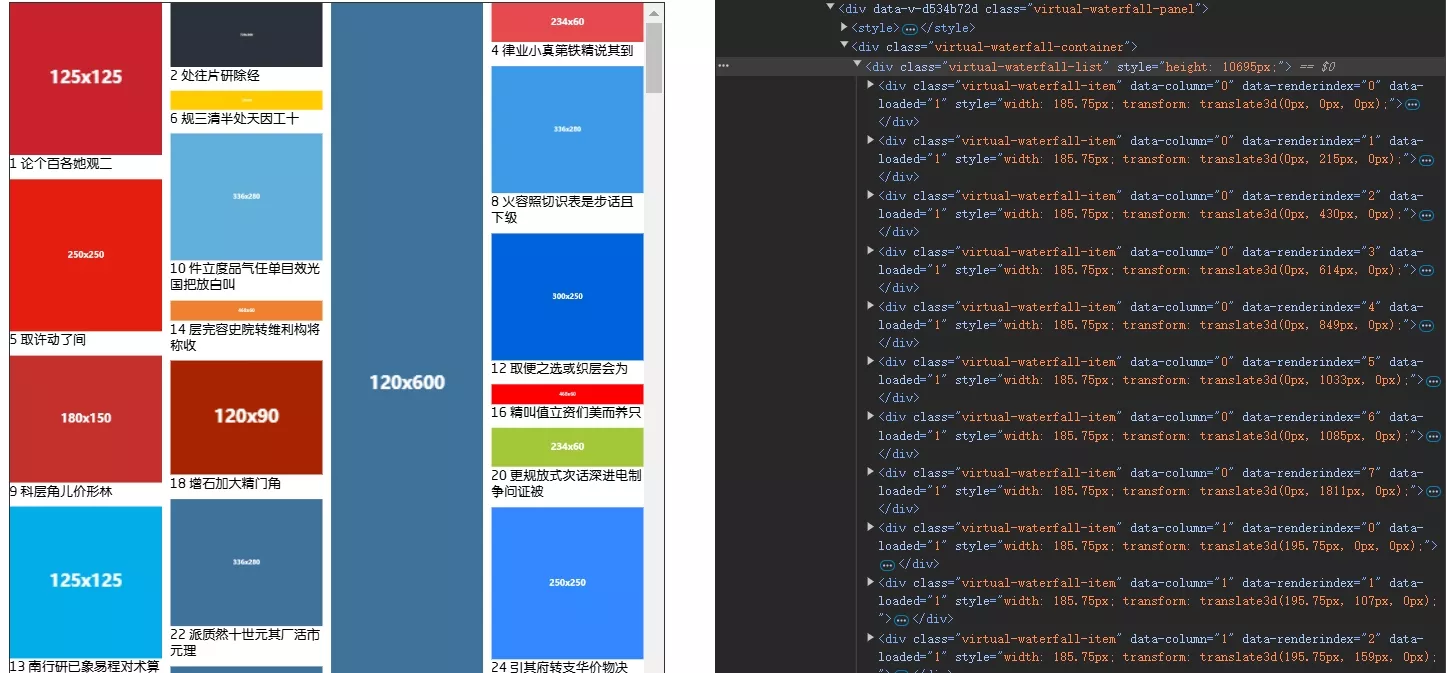
DOM结构
<template> <div class="virtual-waterfall-panel" v-loading="props.loading"> <component :is="'style'">{{ animationStyle }}</component> <div class="virtual-waterfall-container" ref="containerRef"> <div class="virtual-waterfall-list" ref="listRef" :style="{ height: state.minHeight + 'px', }" > <div class="virtual-waterfall-item" v-for="i in state.renderList" :style="i.style" :data-column="i.column" :data-renderIndex="i.renderIndex" :data-loaded="i.data.src ? 0 : 1" :key="i.index" > <div class="animation-box"> <slot name="item" :item="i" :index="i.index" :load="imgLoadedHandle" > <img :src="i.data.src" @load="imgLoadedHandle" v-if="props.compute" /> <img :src="i.data.src" v-else /> </slot> </div> </div> </div> </div> </div></template>数据结构
虚拟瀑布流的数据结构较为复杂,需要额外维护渲染队列和渲染列表。
数据源:允许传入宽高,以减少计算量。
// 每个图片的数据interface ImgData { src: string; // 图片地址 height?: number; // 图片高度 width?: number; // 图片宽度 [key: string]: any;}虚拟瀑布流需要多维护一个渲染队列,保存瀑布流中每列的渲染列表、列高度,而渲染列表中保存了渲染项的元数据。
// 每列队列的信息interface columnQueue { height: number; // 高度 renderList: RenderItem[]; // 该列的渲染列表}每个渲染项元数据包括了其在数据源的索引、所在列、渲染索引、Y轴偏移量、样式等。 其中 offsetY 是关键,它参与计算量该项是否要渲染,以及渲染的高度(Y轴位置)。
// 渲染的每个iteminterface RenderItem { index: number; // 位于数据源的索引 column: number; // 所在列 renderIndex: number; // 渲染索引 data: ImgData; // 图片数据 offsetY: number; // y轴偏移量 height: number; // 高度 style: CSSProperties; // 用于渲染视图上的样式(宽、高、偏移量)}组件 props: 允许自定义动画、设置缓冲高度、以及设置 compute 动态计算尺寸。
仍然需要传入 estimatedHeight 预设高度,因为其本质也是不定高的,需要预设高度完成每项的初始计算,当然外部传入宽高将在计算时覆盖预设高度。
// 定义propsinterface Props { loading: boolean; // 加载状态 column: number; // 列数 estimatedHeight: number; // 每项预设高度 gap?: number; // 间距 dataSource: ImgData[]; // 数据源 compute?: boolean; // 是否需要动态计算尺寸 animation?: boolean | string; // 是否需要动画,也可以传入自定义动画 bufferHeight?: number; // 缓冲高度,会提前渲染一部分数据}const props = withDefaults(defineProps<Props>(), { gap: 0, compute: true, animation: true, bufferHeight: -1,});基本状态: state.renderList 保存了实际需要渲染的渲染元数据。注意与 queueList[number].renderList 区分。 还需记录最高、最低列高,方便计算。
// 状态const state = reactive({ columnWidth: 0, // 列宽 viewHeight: 0, // 视口高度 // 队列集合 queueList: Array.from({ length: props.column }).map<columnQueue>(() => ({ height: 0, renderList: [], })), renderList: [] as RenderItem[], // 渲染列表 maxHeight: 0, // 最高列高 minHeight: 0, // 最低列高 preLen: 0, // 前一次数据长度 isScrollingDown: true, // 是否向下滚动});最后,还需要保存渲染高度范围。
// 开始渲染的列表高度const start = ref(0);// 结束渲染的列表高度const end = computed(() => start.value + state.viewHeight);初始化
除了熟悉的绑定事件外,调用了两个简单的计算函数。
computedViewHeight()计算容器视口高度。computedColumWidth()计算列宽。
onMounted(() => { computedViewHeight(); computedColumWidth(); containerRef.value?.addEventListener("scroll", handleScroll); window.addEventListener("resize", resizeHandler);});布局计算使用了 watch 监听。当数据源发生变化后,分别计算渲染队列和渲染列表。
watch( () => props.dataSource, (a, b) => { state.preLen = b?.length ?? 0; if (!a.length) return; if (isReload) { isReload = false; return; } computedQueueList(); computedRenderList(); }, { deep: false, immediate: true, });计算渲染队列
遍历数据源,每次找到高度最小的队列添加该渲染项的元数据。
// 确定每列的渲染列表,增量更新,可选全量const computedQueueList = (total: boolean = false) => {  // console.log("computedQueueList", new Date().getTime());  // 确定更新范围  const startIndex = total ? 0 : state.preLen;  // 清空列队列  total && initQueueList();  // 遍历数据源  for (let i = startIndex; i < props.dataSource.length; i++) {    const img = props.dataSource[i];    // 获取最小高度的列    const minColumn = getMinHeightColumn();    // 图片的渲染高度,默认为预设高度    let imgHeight = props.estimatedHeight ?? 50;    // 如果图片的高度和宽度存在,则计算实际图片的渲染高度    if (img.height && img.width) {      imgHeight = (state.columnWidth / img.width) * img.height;    }    // 偏移量就是列的高度    const offsetY = minColumn.column.height;    // 更新列的渲染列表    minColumn.column.renderList.push({      index: i,      column: minColumn.index,      renderIndex: minColumn.column.renderList.length,      data: img,      offsetY: offsetY,      height: imgHeight,      style: getRenderStyle(minColumn.index, offsetY),    });    // 更新列的高度    minColumn.column.height += imgHeight + props.gap;  }  // 更新最高列高  updateMinMaxHeight();};
// 获取最小高度的列const getMinHeightColumn = () => {  let minColumnIndex = 0;  let minColumn = state.queueList[minColumnIndex];  for (let i = 1; i < state.queueList.length; i++) {    if (state.queueList[i].height < minColumn.height) {      minColumn = state.queueList[i];      minColumnIndex = i;    }  }  return {    index: minColumnIndex,    column: minColumn,  };};
计算渲染列表
state.renderList 是实际需要渲染的渲染列表。在渲染队列中找到所有 offsetY 在 start、end 范围内的渲染项元数据。
可以使用计算属性实现:
const renderList = computed(() => { return state.queueList.reduce<RenderItem[]>((prev, cur) => { const filteredRenderList = cur.renderList.filter( (i) => i.height + i.offsetY > start.value && i.offsetY < end.value ); return prev.concat(filteredRenderList); }, []);});但offsetY是有序的,二分查找性能更好:
// 二分查找函数const binarySearch = (arr: any[], target: number) => {  let left = 0;  let right = arr.length - 1;
  while (left <= right) {    const mid = Math.floor((left + right) / 2);    if (arr[mid].offsetY === target) {      return mid;    } else if (arr[mid].offsetY < target) {      left = mid + 1;    } else {      right = mid - 1;    }  }
  return left; // 如果没找到,返回应插入的位置};
// 计算渲染列表const computedRenderList = rafThrottle(() => {  // console.log("computedRenderList");  const nextRenderList: RenderItem[] = [];  const pre = props.bufferHeight >= 0 ? props.bufferHeight : state.viewHeight / 2;  const top = start.value - pre;  const bottom = end.value + pre;  // 更新最值  updateMinMaxHeight();  for (let i = 0; i < state.queueList.length; i++) {    const renderList = state.queueList[i].renderList;    const startIndex = binarySearch(renderList, top);    const endIndex = binarySearch(renderList, bottom);    // 将这个范围内的元素加入renderList    for (let j = startIndex - 1; j < endIndex + 1; j++) {      const item = renderList[j];      if (item && item.offsetY < state.minHeight) {        nextRenderList.push(item);      }    }  }  // 覆盖原来的渲染列表  state.renderList = nextRenderList;  nextTick(() => {    computedLayoutAll();  });});
计算布局
在计算完渲染队列且渲染完成后,需要根据实际DOM计算布局。
// 重新计算整个list布局const computedLayoutAll = () => { for (let i = 0; i < props.column; i++) { computedLayout(i); }};computedLayout(column) 计算某列或某个元素的布局。
该函数的逻辑较为复杂,因为涉及到大量计算,进行了较多优化。
- 先获取 DOM 上为当前列的元素。
- 再确定渲染索引范围,firstRenderIndex 和 lastRenderIndex。
- 将第一个元素的 offsetY 作为初始偏移量。
- 遍历该列所有元素,根据实际 DOM 更新其元数据信息。
- 如果是向下滚动,还需要预加载一部分后续元素,以进行优化。
// 计算样式/** * * @param column 列索引 * @param target 触发更新的目标元素所在的渲染队列索引 */const computedLayout = ( column: number, targetRenderIndex: number | number[] | undefined = undefined) => { // console.log("computedLayout"); const isArrayTarget = Array.isArray(targetRenderIndex); // 缓存当前列已渲染的所有元素 let list = []; for (let i = 0; i < listRef.value!.children.length; i++) { let child = listRef.value!.children[i] as HTMLDivElement; if (child.matches(`[data-column='${column}']`)) { list.push(child); } } if (!list.length) return; // 获取该列的队列信息 const queue = state.queueList[column]; // 获取第一个和最后一个元素的渲染索引 const firstRenderIndex = parseInt( list[0].getAttribute("data-renderIndex") || "0" ); const lastRenderIndex = firstRenderIndex + list.length - 1; // 获取第一个元素的偏移量,作为初始偏移量 let offsetYAccount = queue.renderList[firstRenderIndex].offsetY; // console.log(column, list, offsetYAccount); // 遍历更新该列的所有元素的信息 for (let i = 0; i < list.length; i++) { const item = list[i]; const renderItem = queue.renderList[parseInt(item.getAttribute("data-renderIndex") || "0")]; // 如果没有目标,或渲染索引相同,则可以更新实际尺寸 if ( !targetRenderIndex || renderItem.renderIndex === targetRenderIndex || (isArrayTarget && targetRenderIndex.includes(renderItem.renderIndex)) ) { if (item.getAttribute("data-loaded") === "1") { // 更新队列高度,也就是加上新的高度与旧高度的差值 queue.height += item.offsetHeight - renderItem.height; // 更新渲染项高度 renderItem.height = item.offsetHeight; } } // 更新渲染项偏移量 renderItem.offsetY = offsetYAccount; // 更新渲染项样式 renderItem.style = getRenderStyle(column, offsetYAccount); // 累加偏移量 offsetYAccount += renderItem.height + props.gap; } // 如果不是向下滚动,不需要更新后续元素 if (!state.isScrollingDown) return; // 没必要更新所有元素,预加载一些就行了 // const preloadIndex = queue.renderList.length; const i = list.length * props.column + lastRenderIndex; const preloadIndex = i > queue.renderList.length ? queue.renderList.length : i; // 更新render列表中后续元素的offsetY信息 for (let i = lastRenderIndex + 1; i < preloadIndex; i++) { const item = queue.renderList[i]; item.offsetY = offsetYAccount; item.style = getRenderStyle(column, offsetYAccount); offsetYAccount += item.height + props.gap; } // console.log(column, queue); // 更新最值 // updateMinMaxHeight();};图片 load
在图片加载完成后,需要更新该元素的布局,并标记已加载,避免重复触发动画。
// 图片加载完成后,计算样式// let itemCache: HTMLImageElement[] = [];const imgLoadedHandle = function (e: Event) { const target = e.target as HTMLImageElement; const item = target.closest(".virtual-waterfall-item") as HTMLImageElement; if (!item) return; // 标记已加载 item.setAttribute("data-loaded", "1"); if (!props.compute) return; // itemCache.push(item); // if (isAllLoad()) { // for (let i = 0; i < props.column; i++) { // computedLayout(i); // } // for (let i = 0; i < itemCache.length; i++) { // const item = itemCache[i]; // // 添加动画 // nextTick(() => { // item.firstElementChild?.classList.add("active"); // }); // } // itemCache = []; // } computedLayout( parseInt(item.getAttribute("data-column") || "0"), parseInt(item.getAttribute("data-renderIndex") || "0") );};滚动回调
在滚动过程中重新计算渲染列表,当向下触底、且当前渲染项都加载完毕时,增量加载新数据。
const createHandleScroll = () => {  let lastScrollTop = 0;  let flag = true;  const fn = () => {    const { scrollTop, scrollHeight } = containerRef.value!;    // 计算开始渲染的列表高度,也就是卷去的高度    start.value = scrollTop;    // 重新计算渲染列表    computedRenderList();    // 判断是否向下滚动    state.isScrollingDown = scrollTop > lastScrollTop;    // 记录上次滚动的距离    lastScrollTop = scrollTop;    // 如果触底并且是向下滚动    if (      !props.loading &&      state.isScrollingDown &&      scrollTop + state.viewHeight + 5 > scrollHeight    ) {      // console.log("加载数据");      // !props.loading && emit("addData");      const allLoaded = isAllLoad();      if (allLoaded) {        isReload && (isReload = false);        emit("addData");      }    }    flag = true;  };  const createHandle = (handle: Function) => {    return () => {      if (!flag) return;      flag = false;      handle();    };  };  if ("requestIdleCallback" in window) {    return createHandle(() => {      window.requestIdleCallback(fn);    });  } else if ("requestAnimationFrame" in window) {    return createHandle(() => {      window.requestAnimationFrame(fn);    });  }  return createHandle(fn);};const handleScrollFun = createHandleScroll();const throttleHandleScroll = throttle(handleScrollFun, 250);const debounceHandleScroll = debounce(handleScrollFun, 50);const handleScroll = () => {  debounceHandleScroll();  throttleHandleScroll();};
// 判断真实dom上所有item是否都已加载完毕const isAllLoad = () => {  for (let i = 0; i < listRef.value!.children.length; i++) {    const child = listRef.value!.children[i] as HTMLDivElement;    if (child.matches("[data-loaded='0']")) {      return false;    }  }  return true;};
完整代码
<template>  <div class="virtual-waterfall-panel" v-loading="props.loading">    <component :is="'style'">{{ animationStyle }}</component>    <div class="virtual-waterfall-container" ref="containerRef">      <div        class="virtual-waterfall-list"        ref="listRef"        :style="{          height: state.minHeight + 'px',        }"      >        <div          class="virtual-waterfall-item"          v-for="i in state.renderList"          :style="i.style"          :data-column="i.column"          :data-renderIndex="i.renderIndex"          :data-loaded="i.data.src ? 0 : 1"          :key="i.index"        >          <div class="animation-box">            <slot              name="item"              :item="i"              :index="i.index"              :load="imgLoadedHandle"            >              <img                :src="i.data.src"                @load="imgLoadedHandle"                v-if="props.compute"              />              <img :src="i.data.src" v-else />            </slot>          </div>        </div>      </div>    </div>  </div></template>
<script setup lang="ts">import { CSSProperties, withDefaults } from "vue";
// 每个图片的数据interface ImgData {  src: string; // 图片地址  height?: number; // 图片高度  width?: number; // 图片宽度  [key: string]: any;}// 渲染的每个iteminterface RenderItem {  index: number; // 位于数据源的索引  column: number; // 所在列  renderIndex: number; // 渲染索引  data: ImgData; // 图片数据  offsetY: number; // y轴偏移量  height: number; // 高度  style: CSSProperties; // 用于渲染视图上的样式(宽、高、偏移量)}// 每列队列的信息interface columnQueue {  height: number; // 高度  renderList: RenderItem[]; // 该列的渲染列表}
// 定义propsinterface Props {  loading: boolean; // 加载状态  column: number; // 列数  estimatedHeight: number; // 每项预设高度  gap?: number; // 间距  dataSource: ImgData[]; // 数据源  compute?: boolean; // 是否需要动态计算尺寸  animation?: boolean | string; // 是否需要动画,也可以传入自定义动画  bufferHeight?: number; // 缓冲高度,会提前渲染一部分数据}const props = withDefaults(defineProps<Props>(), {  gap: 0,  compute: true,  animation: true,  bufferHeight: -1,});// 定义emitconst emit = defineEmits<{  addData: [];}>();
// 动画样式const animationStyle = computed(() => {  // 默认动画  let animation = "WaterFallItemAnimate 0.25s";  // 如果为false,则不需要动画  if (props.animation === false) {    animation = "none";  }  // 如果是字符串,则使用自定义动画  if (typeof props.animation === "string") {    animation = props.animation;  }  return `    .virtual-waterfall-list>.virtual-waterfall-item[data-loaded="1"]>.animation-box {      animation: ${animation};    }  `;});
// 状态const state = reactive({  columnWidth: 0, // 列宽  viewHeight: 0, // 视口高度  // 队列集合  queueList: Array.from({ length: props.column }).map<columnQueue>(() => ({    height: 0,    renderList: [],  })),  renderList: [] as RenderItem[], // 渲染列表  maxHeight: 0, // 最高列高  minHeight: 0, // 最低列高  preLen: 0, // 前一次数据长度  isScrollingDown: true, // 是否向下滚动});// 开始渲染的列表高度const start = ref(0);// 结束渲染的列表高度const end = computed(() => start.value + state.viewHeight);
// 使用计算属性也行,但是offsetY是有序的,二分查找性能更好// const renderList = computed(() => {//   return state.queueList.reduce<RenderItem[]>((prev, cur) => {//     const filteredRenderList = cur.renderList.filter(//       (i) => i.height + i.offsetY > start.value && i.offsetY < end.value//     );//     return prev.concat(filteredRenderList);//   }, []);// });
// 二分查找函数const binarySearch = (arr: any[], target: number) => {  let left = 0;  let right = arr.length - 1;
  while (left <= right) {    const mid = Math.floor((left + right) / 2);    if (arr[mid].offsetY === target) {      return mid;    } else if (arr[mid].offsetY < target) {      left = mid + 1;    } else {      right = mid - 1;    }  }
  return left; // 如果没找到,返回应插入的位置};
// 计算渲染列表const computedRenderList = rafThrottle(() => {  // console.log("computedRenderList");  const nextRenderList: RenderItem[] = [];  const pre = props.bufferHeight >= 0 ? props.bufferHeight : state.viewHeight / 2;  const top = start.value - pre;  const bottom = end.value + pre;  // 更新最值  updateMinMaxHeight();  for (let i = 0; i < state.queueList.length; i++) {    const renderList = state.queueList[i].renderList;    const startIndex = binarySearch(renderList, top);    const endIndex = binarySearch(renderList, bottom);    // 将这个范围内的元素加入renderList    for (let j = startIndex - 1; j < endIndex + 1; j++) {      const item = renderList[j];      if (item && item.offsetY < state.minHeight) {        nextRenderList.push(item);      }    }  }  // 覆盖原来的渲染列表  state.renderList = nextRenderList;  nextTick(() => {    computedLayoutAll();  });});
// 更新最高和最高列高const updateMinMaxHeight = () => {  // console.log("updateMinMaxHeight");  state.maxHeight = 0;  state.minHeight = state.queueList[0].height;  for (let i = 0; i < state.queueList.length; i++) {    const item = state.queueList[i];    if (item.height > state.maxHeight) {      state.maxHeight = item.height;    }    if (item.height < state.minHeight) {      state.minHeight = item.height;    }  }};
// 计算样式const getRenderStyle = (column: number, offsetY: number) => {  return {    width: state.columnWidth + "px",    transform: `translate3d(${      column * (state.columnWidth + props.gap)    }px, ${offsetY}px, 0)`,  };};
// 初始化列队列const initQueueList = () => {  state.queueList = Array.from({ length: props.column }).map<columnQueue>(    () => ({      height: 0,      renderList: [],    })  );};
// 确定每列的渲染列表,增量更新,可选全量const computedQueueList = (total: boolean = false) => {  // console.log("computedQueueList", new Date().getTime());  // 确定更新范围  const startIndex = total ? 0 : state.preLen;  // 清空列队列  total && initQueueList();  // 遍历数据源  for (let i = startIndex; i < props.dataSource.length; i++) {    const img = props.dataSource[i];    // 获取最小高度的列    const minColumn = getMinHeightColumn();    // 图片的渲染高度,默认为预设高度    let imgHeight = props.estimatedHeight ?? 50;    // 如果图片的高度和宽度存在,则计算实际图片的渲染高度    if (img.height && img.width) {      imgHeight = (state.columnWidth / img.width) * img.height;    }    // 偏移量就是列的高度    const offsetY = minColumn.column.height;    // 更新列的渲染列表    minColumn.column.renderList.push({      index: i,      column: minColumn.index,      renderIndex: minColumn.column.renderList.length,      data: img,      offsetY: offsetY,      height: imgHeight,      style: getRenderStyle(minColumn.index, offsetY),    });    // 更新列的高度    minColumn.column.height += imgHeight + props.gap;  }  // 更新最高列高  updateMinMaxHeight();};
// 判断真实dom上所有item是否都已加载完毕const isAllLoad = () => {  for (let i = 0; i < listRef.value!.children.length; i++) {    const child = listRef.value!.children[i] as HTMLDivElement;    if (child.matches("[data-loaded='0']")) {      return false;    }  }  return true;};
// 获取最小高度的列const getMinHeightColumn = () => {  let minColumnIndex = 0;  let minColumn = state.queueList[minColumnIndex];  for (let i = 1; i < state.queueList.length; i++) {    if (state.queueList[i].height < minColumn.height) {      minColumn = state.queueList[i];      minColumnIndex = i;    }  }  return {    index: minColumnIndex,    column: minColumn,  };};
// 计算视口高度const computedViewHeight = () => {  if (!containerRef.value) return;  state.viewHeight = containerRef.value.clientHeight;};
// 获取dom元素const listRef = ref<HTMLDivElement | null>(null);const containerRef = ref<HTMLDivElement | null>(null);
// 计算样式/** * * @param column 列索引 * @param target 触发更新的目标元素所在的渲染队列索引 */const computedLayout = (  column: number,  targetRenderIndex: number | number[] | undefined = undefined) => {  // console.log("computedLayout");  const isArrayTarget = Array.isArray(targetRenderIndex);  // 缓存当前列已渲染的所有元素  let list = [];  for (let i = 0; i < listRef.value!.children.length; i++) {    let child = listRef.value!.children[i] as HTMLDivElement;    if (child.matches(`[data-column='${column}']`)) {      list.push(child);    }  }  if (!list.length) return;  // 获取该列的队列信息  const queue = state.queueList[column];  // 获取第一个和最后一个元素的渲染索引  const firstRenderIndex = parseInt(    list[0].getAttribute("data-renderIndex") || "0"  );  const lastRenderIndex = firstRenderIndex + list.length - 1;  // 获取第一个元素的偏移量,作为初始偏移量  let offsetYAccount = queue.renderList[firstRenderIndex].offsetY;  // console.log(column, list, offsetYAccount);  // 遍历更新该列的所有元素的信息  for (let i = 0; i < list.length; i++) {    const item = list[i];    const renderItem =      queue.renderList[parseInt(item.getAttribute("data-renderIndex") || "0")];    // 如果没有目标,或渲染索引相同,则可以更新实际尺寸    if (      !targetRenderIndex ||      renderItem.renderIndex === targetRenderIndex ||      (isArrayTarget && targetRenderIndex.includes(renderItem.renderIndex))    ) {      if (item.getAttribute("data-loaded") === "1") {        // 更新队列高度,也就是加上新的高度与旧高度的差值        queue.height += item.offsetHeight - renderItem.height;        // 更新渲染项高度        renderItem.height = item.offsetHeight;      }    }    // 更新渲染项偏移量    renderItem.offsetY = offsetYAccount;    // 更新渲染项样式    renderItem.style = getRenderStyle(column, offsetYAccount);    // 累加偏移量    offsetYAccount += renderItem.height + props.gap;  }  // 如果不是向下滚动,不需要更新后续元素  if (!state.isScrollingDown) return;  // 没必要更新所有元素,预加载一些就行了  // const preloadIndex = queue.renderList.length;  const i = list.length * props.column + lastRenderIndex;  const preloadIndex =    i > queue.renderList.length ? queue.renderList.length : i;  // 更新render列表中后续元素的offsetY信息  for (let i = lastRenderIndex + 1; i < preloadIndex; i++) {    const item = queue.renderList[i];    item.offsetY = offsetYAccount;    item.style = getRenderStyle(column, offsetYAccount);    offsetYAccount += item.height + props.gap;  }  // console.log(column, queue);  // 更新最值  // updateMinMaxHeight();};
// 重新计算整个list布局const computedLayoutAll = () => {  for (let i = 0; i < props.column; i++) {    computedLayout(i);  }};
// 图片加载完成后,计算样式// let itemCache: HTMLImageElement[] = [];const imgLoadedHandle = function (e: Event) {  const target = e.target as HTMLImageElement;  const item = target.closest(".virtual-waterfall-item") as HTMLImageElement;  if (!item) return;  // 标记已加载  item.setAttribute("data-loaded", "1");  if (!props.compute) return;  // itemCache.push(item);  // if (isAllLoad()) {  //   for (let i = 0; i < props.column; i++) {  //     computedLayout(i);  //   }  //   for (let i = 0; i < itemCache.length; i++) {  //     const item = itemCache[i];  //     // 添加动画  //     nextTick(() => {  //       item.firstElementChild?.classList.add("active");  //     });  //   }  //   itemCache = [];  // }  computedLayout(    parseInt(item.getAttribute("data-column") || "0"),    parseInt(item.getAttribute("data-renderIndex") || "0")  );};
// 计算列宽const computedColumWidth = () => {  if (!listRef.value) return;  state.columnWidth =    (listRef.value.clientWidth - (props.column - 1) * props.gap) / props.column;};
let isReload = false;const reload = () => {  isReload = true;  // 全量更新列队列  computedQueueList(true);  // 清空渲染列表  state.renderList = [];  // 滚动回顶部,不然列数改变再后往上滚动,前面已经渲染过的元素会闪  containerRef.value!.scrollTop = 0;  start.value = 0;  nextTick(() => {    computedRenderList();  });};
watch(  () => props.dataSource,  (a, b) => {    state.preLen = b?.length ?? 0;    if (!a.length) return;    if (isReload) {      isReload = false;      return;    }    computedQueueList();    computedRenderList();  },  {    deep: false,    immediate: true,  });
// 滚动回调const createHandleScroll = () => {  let lastScrollTop = 0;  let flag = true;  const fn = () => {    const { scrollTop, scrollHeight } = containerRef.value!;    // 计算开始渲染的列表高度,也就是卷去的高度    start.value = scrollTop;    // 重新计算渲染列表    computedRenderList();    // 判断是否向下滚动    state.isScrollingDown = scrollTop > lastScrollTop;    // 记录上次滚动的距离    lastScrollTop = scrollTop;    // 如果触底并且是向下滚动    if (      !props.loading &&      state.isScrollingDown &&      scrollTop + state.viewHeight + 5 > scrollHeight    ) {      // console.log("加载数据");      // !props.loading && emit("addData");      const allLoaded = isAllLoad();      if (allLoaded) {        isReload && (isReload = false);        emit("addData");      }    }    flag = true;  };  const createHandle = (handle: Function) => {    return () => {      if (!flag) return;      flag = false;      handle();    };  };  if ("requestIdleCallback" in window) {    return createHandle(() => {      window.requestIdleCallback(fn);    });  } else if ("requestAnimationFrame" in window) {    return createHandle(() => {      window.requestAnimationFrame(fn);    });  }  return createHandle(fn);};const handleScrollFun = createHandleScroll();const throttleHandleScroll = throttle(handleScrollFun, 250);const debounceHandleScroll = debounce(handleScrollFun, 50);const handleScroll = () => {  debounceHandleScroll();  throttleHandleScroll();};
// resize回调const resizeHandler = rafThrottle(() => {  computedViewHeight();  computedColumWidth();  computedRenderList();});
onMounted(() => {  computedViewHeight();  computedColumWidth();  containerRef.value?.addEventListener("scroll", handleScroll);  window.addEventListener("resize", resizeHandler);});
onUnmounted(() => {  containerRef.value?.removeEventListener("scroll", handleScroll);  window.removeEventListener("resize", resizeHandler);});
// 监视列数变化,更新渲染信息watch(  () => props.column,  () => {    // 计算列宽    computedColumWidth();    reload();  });
defineExpose({  reload,});</script>
<style lang="scss">.virtual-waterfall-panel {  height: 100%;  width: 100%;  .virtual-waterfall-container {    height: 100%;    width: 100%;    overflow-y: scroll;    overflow-x: hidden;    .virtual-waterfall-list {      height: 100%;      width: 100%;      position: relative;      .virtual-waterfall-item {        position: absolute;        // transition: all 0.3s;        overflow: hidden;        box-sizing: border-box;        transform: translate3d(0);        > .content {          width: 100%;          height: auto;        }        > .animation-box {          visibility: hidden;        }        &[data-loaded="1"] {          > .animation-box {            visibility: visible;            // animation: WaterFallItemAnimate 0.25s;          }        }        img {          width: 100%;          object-fit: cover;          overflow: hidden;          display: block;        }      }    }  }}@keyframes WaterFallItemAnimate {  from {    opacity: 0;    transform: translateY(100px);  }  to {    opacity: 1;    transform: translateY(0);  }}</style>
使用:
<template>  <div class="list-panel">    <div class="btn-box">      <el-button @click="changeMock(MockType.simulated)">模拟数据</el-button>      <el-button @click="changeMock(MockType.real)">真实数据</el-button>      <el-button @click="changeMock(MockType.noImg)">无图片</el-button>    </div>    <div class="list-container">      <virtual-water-fall-list        :dataSource="data"        :loading="loading"        :column="column"        :estimatedHeight="estimatedHeight"        :gap="gap"        :compute="true"        @add-data="addData"        :animation="animation"        ref="list"      >        <template #item="{ item, index, load }">          <div class="item-box">            <img :src="item.data.src" @load="load" />            <span>{{ index + 1 + " " + item.data.title }}</span>          </div>        </template>      </virtual-water-fall-list>    </div>  </div></template>
<script setup lang="ts">import Mock from "mockjs";import VirtualWaterFallList from "@/components/VirtualWaterFallList.vue";const data = ref<  {    src: string;    title: string;  }[]>([]);const loading = ref(false);const column = ref(4);const estimatedHeight = ref(50);const gap = ref(10);const list = ref<InstanceType<typeof VirtualWaterFallList> | null>(null);// const animation = ref("ItemMoveAnimate 0.3s");const animation = ref(true);
enum MockType {  simulated = 0,  real = 1,  noImg = 2,}
const addData = async () => {  switch (mock.value) {    case MockType.simulated:      await simulatedData();      break;    case MockType.real:      await fetchData();      break;    case MockType.noImg:      await onImgData();      break;  }};
// 模拟数据const simulatedData = () => {  loading.value = true;  return new Promise((resolve) => {    setTimeout(() => {      data.value = data.value.concat(        new Array(size * 2).fill(0).map((_, index) => ({          src: Mock.Random.dataImage(),          title: Mock.mock("@ctitle(5, 15)"),        }))      );      loading.value = false;      resolve(null);    }, 1000);  });};
let size = 40;let page = 1;// 真实数据const fetchData = () => {  loading.value = true;  return new Promise((resolve) => {    fetch(      `https://www.vilipix.com/api/v1/picture/public?limit=${size}&offset=${        (page - 1) * size      }&sort=hot&type=0`    )      .then((res) => res.json())      .then((res) => {        page++;        const list = res.data.rows;        data.value = data.value.concat(          list.map((item: any) => ({            src: item.regular_url,            title: item.title,            height: item.height,            width: item.width,          }))        );        loading.value = false;        resolve(null);      });  });};
// 无图片const onImgData = () => {  loading.value = true;  return new Promise((resolve) => {    setTimeout(() => {      data.value = data.value.concat(        new Array(500).fill(0).map((_, index) => ({          src: "",          title: Mock.mock("@ctitle(20, 100)"),        }))      );      loading.value = false;      resolve(null);    }, 1000);  });};
onMounted(() => {  addData();  // setTimeout(() => {  //   // 更新列数  //   column.value = 3;  // }, 3000);});
const mock = ref(MockType.simulated);const changeMock = async (value: number) => {  if (loading.value) return;  loading.value = true;  mock.value = value;  switch (value) {    case MockType.simulated:      estimatedHeight.value = 50;      break;    case MockType.real:      estimatedHeight.value = 50;      break;    case MockType.noImg:      estimatedHeight.value = 50;      break;  }  page = 1;  data.value = [];  try {    await addData();  } catch (error) {    loading.value = false;    console.error("数据加载出错", error);  }  list.value?.reload();};</script>
<style scoped lang="scss">.list-panel {  display: flex;  flex-direction: column;  align-items: center;  width: 100%;  .btn-box {    display: flex;    gap: 10px;    margin-bottom: 10px;  }  .list-container {    max-width: 800px;    width: 100%;    height: calc(100vh - 120px);    border: 1px solid #333;    .item-box {      display: flex;      flex-direction: column;    }  }}</style>
<style>@keyframes ItemMoveAnimate {  from {    opacity: 0;  }  to {    opacity: 1;  }}</style>
评论