
前言
起因是群里有人提出,搜索关键词后只能跳转到对应文章,而不能自动再跳转至关键词处,当然,本文不是实现这个(实际上已经实现了),这给了我一个想法,为啥不弄个文本锚点呢,把选中的文本都保存起来,点击就滚动页面过去,这是一个不错的主意。
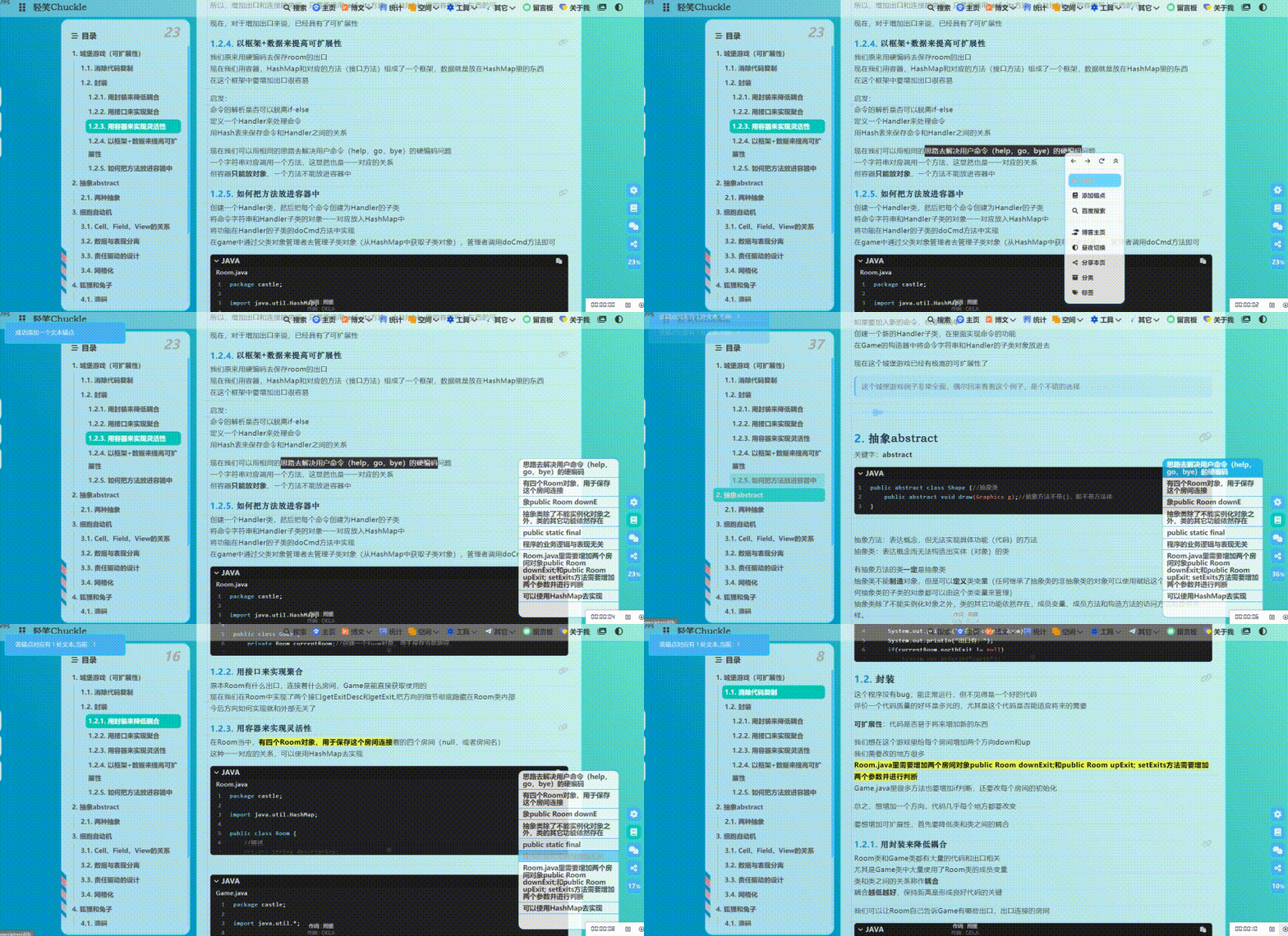
**功能:**选中页面文字保存锚点,点击锚点,页面滚动到对应文本处并背景高亮,当一个锚点对应多处文本时,多次点击锚点,页面能循环地逐个滚动到对应位置。
效果:
实现
首先是右侧悬浮栏的锚点按钮和容器,修改\layout\includes\rightside.pug,对应着原有缩进添加。
when 'anchor'    if is_post()        button#post-anchor            i.fas.fa-book            #post-anchor-after            #post-anchor-rom              #post-anchor-box                #no-anchor 没有锚点                script.                  var anchor_back = '';                  var anchor_length = 0;                  var anchor_node = '';                  function toAnchor(obj) {                    var anchor = $(obj).text();                    $("anchorbox").parent().each(function(){                      $(this).html($(this).html().replace(/(<\/?anchorbox.*?>)/g,''));                    })
                    if(anchor_back == anchor){                      i++;                      if(i>=anchor_length){                        i = 0;                      }                    }else{                      i = 0;                      anchor_back = anchor;                      anchor_node = $('#article-container *:contains('+anchor+')').not(".highlight *,.mini-sandbox *,.tag.link *,.folding-tag *");                      anchor_length = anchor_node.length;                    }                    if(anchor_length>0){                      btf.snackbarShow("该锚点对应有 "+anchor_length+" 处文本,当前:"+(i+1));                      btf.scrollToDest(anchor_node.eq(i).offset().top-200);                    }else{                      btf.snackbarShow("文章内没有对应文本或出现致命错误,请避免选中跨标签跨行文本。");                    }                    let input = anchor;                    let textNodes = [];                    (function getTextNodes(node) {                      if (node.nodeType === Node.TEXT_NODE) {                        textNodes.push(node);                      } else {                        for (let i = 0; i < node.childNodes.length; i++) {                          getTextNodes(node.childNodes[i]);                        }                      }                    })(document.getElementById("article-container"));                    for (let i = 0; i < textNodes.length; i++) {                      let node = textNodes[i];                      let text = node.nodeValue;                      let index = text.indexOf(input);                      if (index !== -1) {                        let newNode = document.createElement("anchorbox");                        newNode.appendChild(document.createTextNode(text.substring(index, index + input.length)));                        node.nodeValue = text.substring(0, index);                        node.parentNode.insertBefore(newNode, node.nextSibling);                        node.parentNode.insertBefore(document.createTextNode(text.substring(index + input.length)), newNode.nextSibling);                      }                    }                  }…………
#rightside - const { enable, hide, show } = theme.rightside_item_order - const hideArray = enable ? hide && hide.split(',') : ['refresh','translate','enlargePage','narrowPage','bg','darkmode','hideAside'] //在下面添加个'anchor' - const showArray = enable ? show && show.split(',') : ['toc','anchor','chat','comment', 'share'] 然后是右键选中文字添加锚点按钮rightside.pug
a.rightMenu-item(href="javascript:addAnchor();") script. function addAnchor () { if($("#no-anchor").length > 0){ $("#no-anchor").remove(); } var txt = window.getSelection().toString(); txt = txt.replace(/<[^>]*>/g, ""); $("#post-anchor-box").prepend('<a class="anchor-item" href="javascript:void(0);" onclick="toAnchor(this)" data-pjax-state="">'+txt+'</a>'); btf.snackbarShow("成功添加一个文本锚点"); } i.fa.fa-book span='添加锚点' 当然没有右键就把js拿去,监听下选中文字后弹出个按钮触发一下addAnchor()就行。右键教程可看自定义右键菜单
添加CSS:
#post-anchor{ z-index: 10!important;}#post-anchor-rom{ position: fixed; width: auto; overflow: hidden; border-radius: 12px; bottom: 20px; right: -241px; border: var(--anchor-border); transition: all .27s; opacity: 0; max-height: 380px; height: 100%; width: 240px; z-index: 9;}#post-anchor-box{ display:flex; background: #fff; max-height: 380px; height: 100%; flex-wrap: nowrap; flex-direction: column; justify-content: flex-start; border-radius: 12px; overflow: auto;}#post-anchor-after{ display: none; position: fixed; bottom: 20px; right: 0px; background: transparent; max-height: 380px; height: 100%; width: 100px;}#post-anchor-box a{ padding: 5px 10px; width: 100%; border-bottom: 1px solid rgb(8, 148, 235); font-weight: 800;}#post-anchor:hover #post-anchor-rom{ opacity: 1; right: 70px; transition: all .25s;}#post-anchor:hover #post-anchor-after{ display:block;}#article-container anchorbox{ color: black!important; font-weight: 800!important; border-radius: 6px!important; background-color: rgb(253 253 20 / 70%)!important;}a.anchor-item{ font-size: 16px; line-height: 17px; text-align: left;}a.anchor-item:hover{ background-color: #16b2ef; color: #fff;}#no-anchor{ color: rgb(140, 140, 140); font-size: 30px; line-height: 375px; opacity: 0.8;}[data-theme=dark]#post-anchor-box{ background: #000;}[data-theme=dark]#article-container anchor{ color: rgb(255, 255, 255);}@media screen and (max-width:768px){ #rightside #post-anchor{ display: none!important; }}后记
因为是文章页才用到的JS,不是全局的,量也不多,就直接写在pug里了,还能避免pjax的适配问题。
已知BUG:选中锚点跨标签的话,可以跳转,但是没法套标签使背景高亮,这就emm有点烦。当选中的文本只包含半个右半边英文括号时,锚点会无法跳转和高亮,原因未知。
评论