所看教程(视频):《浙江大学-翁恺-Java-面向对象程序设计》 作为我自己的复习笔记,也可以当做该视频的同步笔记 上接JAVA/面向对象学习笔记(1)
城堡游戏(可扩展性)
整体思路:用Room先初始化5个房间,Room类中有房间名称、四个方向所连接的房间,currentRoom = outside;设置出生点
进入goRoom方法,匹配用户输入的方向,让nextroom指向下一个房间,然后让currentRoom = outside;并输出房间信息。
大致以此循环
package castle;
public class Room {    //房间名称    public String description;    //房间四个方向连接的房间    public Room northExit;    public Room southExit;    public Room eastExit;    public Room westExit;

    public Room(String description)//初始化房间名    {        this.description = description;    }
    public void setExits(Room north, Room east, Room south, Room west)//设置房间的四个方向的连接    {        if (north != null)            northExit = north;        if (east != null)            eastExit = east;        if (south != null)            southExit = south;        if (west != null)            westExit = west;    }
    @Override    public String toString() {        return description;//输出房间名    }
}
package castle;
import java.util.*;
public class Game { private Room currentRoom;//创建一个Room对象,用于保存当前房间
public Game()//构造函数 { creatRooms();//创建房间 }
private void creatRooms()//创建一个房间 { Room outside, lobby,pub,study,bedroom;//创建5种房间
// 制造5种房间 outside = new Room("城堡外"); lobby = new Room("大堂"); pub = new Room("小酒吧"); study = new Room("书房"); bedroom = new Room("卧室");
// 初始化房间的出口 outside.setExits(null,lobby,study,pub); lobby.setExits(null,null,null,outside); pub.setExits(null,outside,null,null); study.setExits(outside,bedroom,null,null); bedroom.setExits(null,null,null,study);
currentRoom = outside; //从城堡门外开始 }
private void printWelcome()//输出欢迎信息 { System.out.println(); System.out.println("欢迎来到城堡!"); System.out.println("这是一个超级无聊的游戏。"); System.out.println("如果需要帮助,请输入'help'"); System.out.println(); System.out.println("现在你在:" + currentRoom); System.out.println("出口有:"); //输出当前房间的出口 if(currentRoom.northExit !=null) System.out.print("north "); if(currentRoom.eastExit !=null) System.out.print("east "); if(currentRoom.southExit !=null) System.out.print("south "); if(currentRoom.westExit !=null) System.out.print("west "); System.out.println(); }
// 以下为用户命令
private void printHelp()//帮助菜单 { System.out.println("迷路了吗?你可以做的命令有:go bye help"); System.out.println("如:\tgo east"); }
private void goRoom(String direction) { Room nextRoom = null;//创建一个Room对象,用于保存下一个房间 // 在当前房间的出口中查找与用户输入的方向相同的房间 if(direction.equals("north")){ nextRoom = currentRoom.northExit; } if(direction.equals("east")){ nextRoom = currentRoom.eastExit; } if(direction.equals("south")){ nextRoom = currentRoom.southExit; } if(direction.equals("west")){ nextRoom = currentRoom.westExit; } // 如果找到了下一个房间,则进入下一个房间 if(nextRoom == null){ System.out.println("那里没有门!"); } else{ currentRoom = nextRoom;//让当前房间等于下一个房间 // 输出当前房间的描述 System.out.println("你在"+ currentRoom); System.out.println("出口有:"); if(currentRoom.northExit != null) System.out.println("north"); if(currentRoom.eastExit != null) System.out.println("east"); if(currentRoom.southExit != null) System.out.println("south"); if(currentRoom.westExit != null) System.out.println("west"); System.out.println(); } }
public static void main(String[] args) { Scanner in = new Scanner(System.in); //通过new Scanner(System.in)创建一个Scanner,控制台会一直等待输入,直到敲回车键结束,把所输入的内容传给Scanner,作为扫描对象。 Game game = new Game(); game.printWelcome();//输出欢迎信息
while (true)//进入游戏主体,游戏结束时退出循环 { String line = in.nextLine();//控制台输入一行 String[] words = line.split(" ");//以空格为分隔符,把用户输入的字符串分割成字符串数组 //判断是go还是help if ( words[0].equals("help")){ game.printHelp();//输出帮助信息 }else if ( words[0].equals("go")){ game.goRoom(words[1]);//将用户输入的方向传给goRoom方法 }else if ( words[0].equals("bye")){ break;//如果用户数据为bye,则退出游戏 } } System.out.println("感谢您的光临。再见!"); in.close();//关闭Scanner }}欢迎来到城堡!这是一个超级无聊的游戏。如果需要帮助,请输入'help'
你在城堡外出口有:eastsouthwest
go south你在书房出口有:northeast
go east你在卧室出口有:west
help迷路了吗?你可以做的命令有:go bye help如: go eastbye感谢您的光临。再见!消除代码复制
在printWelcome和goRoom方法中都有一段相同的输出出口方向的代码
将这段代码提取出来,做成一个方法,在需要输出房间信息的地方调用即可
public void showPrompt(){ // 输出当前房间的描述 System.out.println("你在"+ currentRoom); System.out.println("出口有:"); if(currentRoom.northExit != null) System.out.println("north"); if(currentRoom.eastExit != null) System.out.println("east"); if(currentRoom.southExit != null) System.out.println("south"); if(currentRoom.westExit != null) System.out.println("west"); System.out.println();}封装
这个程序没有bug,能正常运行,但不见得是一个好的代码
评价一个代码质量的好坏是多元的,尤其是这个代码是否能适应将来的需要
可扩展性:代码是否易于将来增加新的东西
我们想在这个游戏里给每个房间增加两个方向down和up
我们需要改的地方很多
Room.java里需要增加两个房间对象public Room downExit;和public Room upExit; setExits方法需要增加两个参数并进行判断
Game.java里很多方法也要增加if判断,还要改每个房间的初始化
总之,想增加一个方向,代码几乎每个地方都要改变
要想增加可扩展性,首先要降低类和类之间的耦合
用封装来降低耦合
Room类和Game类都有大量的代码和出口相关
尤其是Game类中大量使用了Room类的成员变量
类和类之间的关系称作耦合
耦合越低越好,保持距离是形成良好代码的关键
我们可以让Room自己告诉Game有哪些出口,出口连接的房间
package castle;
public class Room {    //房间名称    private String description;    //public String description;    //房间四个方向连接的房间    private Room northExit;    private Room southExit;    private Room eastExit;    private Room westExit;    /*public Room northExit;    public Room southExit;    public Room eastExit;    public Room westExit;*/

    public Room(String description)//初始化房间名    {        this.description = description;    }
    public void setExits(Room north, Room east, Room south, Room west)//设置房间的四个方向的连接    {        if (north != null)            northExit = north;        if (east != null)            eastExit = east;        if (south != null)            southExit = south;        if (west != null)            westExit = west;    }
    @Override    public String toString() {        return description;//输出房间名    }
    public String getExitDesc() {        //返回一个字符串,来表达房间的出口        /*String returnString = "Exits:";        if (northExit != null)            returnString += "north ";        if (eastExit != null)            returnString += "east ";        if (southExit != null)            returnString += "south ";        if (westExit != null)            returnString += "west ";        return returnString;*/        //一般我们不使用String去做拼接,因为每次加都会产生一个新的String类型的对象,系统开销会很大,而是使用StringBuilder        StringBuilder builder = new StringBuilder("出口有:");        if (northExit != null)            builder.append("north ");        if (eastExit != null)            builder.append("east ");        if (southExit != null)            builder.append("south ");        if (westExit != null)            builder.append("west ");        return builder.toString();    }
    public Room getExit(String direction) {        //返回指定方向的连接房间        if (direction.equals("north"))            return northExit;        if (direction.equals("east"))            return eastExit;        if (direction.equals("south"))            return southExit;        if (direction.equals("west"))            return westExit;        return null;    }}
package castle;
import java.util.*;
public class Game { private Room currentRoom;//创建一个Room对象,用于保存当前房间
public Game()//构造函数 { creatRooms();//创建房间 }
private void creatRooms()//创建一个房间 { Room outside, lobby,pub,study,bedroom;//创建5种房间
// 制造5种房间 outside = new Room("城堡外"); lobby = new Room("大堂"); pub = new Room("小酒吧"); study = new Room("书房"); bedroom = new Room("卧室");
// 初始化房间的出口 outside.setExits(null,lobby,study,pub); lobby.setExits(null,null,null,outside); pub.setExits(null,outside,null,null); study.setExits(outside,bedroom,null,null); bedroom.setExits(null,null,null,study);
currentRoom = outside; //从城堡门外开始 }
private void printWelcome()//输出欢迎信息 { System.out.println(); System.out.println("欢迎来到城堡!"); System.out.println("这是一个超级无聊的游戏。"); System.out.println("如果需要帮助,请输入'help'"); System.out.println(); showPrompt(); /*System.out.println("现在你在:" + currentRoom); System.out.println("出口有:"); //输出当前房间的出口 if(currentRoom.northExit !=null) System.out.print("north "); if(currentRoom.eastExit !=null) System.out.print("east "); if(currentRoom.southExit !=null) System.out.print("south "); if(currentRoom.westExit !=null) System.out.print("west "); System.out.println();*/ }
// 以下为用户命令
private void printHelp()//帮助菜单 { System.out.println("迷路了吗?你可以做的命令有:go bye help"); System.out.println("如:\tgo east"); }
private void goRoom(String direction) { Room nextRoom = currentRoom.getExit(direction);//创建一个Room对象,用于保存下一个房间 // 在当前房间的出口中查找与用户输入的方向相同的房间 /*if(direction.equals("north")){ nextRoom = currentRoom.northExit; } if(direction.equals("east")){ nextRoom = currentRoom.eastExit; } if(direction.equals("south")){ nextRoom = currentRoom.southExit; } if(direction.equals("west")){ nextRoom = currentRoom.westExit; }*/ // 如果找到了下一个房间,则进入下一个房间 if(nextRoom == null){ System.out.println("那里没有门!"); } else{ currentRoom = nextRoom;//让当前房间等于下一个房间 // 输出当前房间的描述 showPrompt(); /*System.out.println("你在"+ currentRoom); System.out.println("出口有:"); if(currentRoom.northExit != null) System.out.println("north"); if(currentRoom.eastExit != null) System.out.println("east"); if(currentRoom.southExit != null) System.out.println("south"); if(currentRoom.westExit != null) System.out.println("west"); System.out.println();*/ } }
public void showPrompt() { // 输出当前房间的描述 System.out.println("你在"+ currentRoom); //调用房间的getExitString()方法,输出当前房间的出口 System.out.println(currentRoom.getExitDesc()); /*System.out.println("出口有:"); if(currentRoom.northExit != null) System.out.println("north"); if(currentRoom.eastExit != null) System.out.println("east"); if(currentRoom.southExit != null) System.out.println("south"); if(currentRoom.westExit != null) System.out.println("west"); System.out.println();*/ }
public static void main(String[] args) { Scanner in = new Scanner(System.in); //通过new Scanner(System.in)创建一个Scanner,控制台会一直等待输入,直到敲回车键结束,把所输入的内容传给Scanner,作为扫描对象。 Game game = new Game(); game.printWelcome();//输出欢迎信息
while (true)//进入游戏主体,游戏结束时退出循环 { String line = in.nextLine();//控制台输入一行 String[] words = line.split(" ");//以空格为分隔符,把用户输入的字符串分割成字符串数组 //判断是go还是help if ( words[0].equals("help")){ game.printHelp();//输出帮助信息 }else if ( words[0].equals("go")){ game.goRoom(words[1]);//将用户输入的方向传给goRoom方法 }else if ( words[0].equals("bye")){ break;//如果用户数据为bye,则退出游戏 } } System.out.println("感谢您的光临。再见!"); in.close();//关闭Scanner }}用接口来实现聚合
原本Room有什么出口,连接着什么房间,Game是能直接获取使用的
现在我们在Room中实现了两个接口getExitDesc和getExit,把方向的细节彻底隐藏在Room类内部
今后方向如何实现就和外部无关了
用容器来实现灵活性
在Room当中,有四个Room对象,用于保存这个房间连接着的四个房间(null,或者房间名)
这种一一对应的关系,可以使用HashMap去实现
package castle;
import java.util.HashMap;
public class Room {    //描述    private String description;    //用HashMap来保存这个房间连接着的四个房间    private HashMap<String, Room> exits = new HashMap<String, Room>();    /*private Room northExit;    private Room southExit;    private Room eastExit;    private Room westExit;*/
    public Room(String description)//初始化房间名    {        this.description = description;    }
    public void setExits(String direction, Room room) {        exits.put(direction, room);//将出口方向和连接的房间放进容器中    }
    /*public void setExits(Room north, Room east, Room south, Room west)//设置房间的四个方向的连接    {        if (north != null)            northExit = north;        if (east != null)            eastExit = east;        if (south != null)            southExit = south;        if (west != null)            westExit = west;    }*/
    @Override    public String toString() {        return description;//输出房间名    }
    public String getExitDesc() {        //返回一个字符串,来表达房间的出口        //一般我们不使用String去做拼接,因为每次加都会产生一个新的String类型的对象,系统开销会很大,而是使用StringBuilder        StringBuilder builder = new StringBuilder("出口有:");        for (String direction : exits.keySet()) {            builder.append(direction);            builder.append(" ");        }        /*if (northExit != null)            builder.append("north ");        if (eastExit != null)            builder.append("east ");        if (southExit != null)            builder.append("south ");        if (westExit != null)            builder.append("west ");*/        return builder.toString();    }
    public Room getExit(String direction) {        //返回指定方向的连接房间        return exits.get(direction);//直接从HashMap中获取房间,如果没有容器会自动返回null        /*if (direction.equals("north"))            return northExit;        if (direction.equals("east"))            return eastExit;        if (direction.equals("south"))            return southExit;        if (direction.equals("west"))            return westExit;        return null;*/    }}
package castle;
import java.util.*;
public class Game { private Room currentRoom;//创建一个Room对象,用于保存当前房间
public Game()//构造函数 { creatRooms();//创建房间 }
private void creatRooms()//创建一个房间 { Room outside, lobby,pub,study,bedroom;//创建5种房间
// 制造5种房间 outside = new Room("城堡外"); lobby = new Room("大堂"); pub = new Room("小酒吧"); study = new Room("书房"); bedroom = new Room("卧室");
// 初始化房间的出口 outside.setExits("east", lobby); outside.setExits("south", study); outside.setExits("west", pub); lobby.setExits("west", outside); pub.setExits("east", outside); study.setExits("north", outside); study.setExits("east", bedroom); bedroom.setExits("west", study); //现在当我们想增加出口方向,很简单 lobby.setExits("up", pub); pub.setExits("down", lobby);
/*outside.setExits(null,lobby,study,pub); lobby.setExits(null,null,null,outside); pub.setExits(null,outside,null,null); study.setExits(outside,bedroom,null,null); bedroom.setExits(null,null,null,study);*/
currentRoom = outside; //从城堡门外开始 }
private void printWelcome()//输出欢迎信息 { System.out.println(); System.out.println("欢迎来到城堡!"); System.out.println("这是一个超级无聊的游戏。"); System.out.println("如果需要帮助,请输入'help'"); System.out.println(); showPrompt(); }
// 以下为用户命令
private void printHelp()//帮助菜单 { System.out.println("迷路了吗?你可以做的命令有:go bye help"); System.out.println("如:\tgo east"); }
private void goRoom(String direction) { Room nextRoom = currentRoom.getExit(direction);//创建一个Room对象,用于保存下一个房间 // 如果找到了下一个房间,则进入下一个房间 if(nextRoom == null){ System.out.println("那里没有门!"); } else{ currentRoom = nextRoom;//让当前房间等于下一个房间 // 输出当前房间的描述 showPrompt(); } }
public void showPrompt() { // 输出当前房间的描述 System.out.println("你在"+ currentRoom); //调用房间的getExitString()方法,输出当前房间的出口 System.out.println(currentRoom.getExitDesc()); }
public static void main(String[] args) { Scanner in = new Scanner(System.in); //通过new Scanner(System.in)创建一个Scanner,控制台会一直等待输入,直到敲回车键结束,把所输入的内容传给Scanner,作为扫描对象。 Game game = new Game(); game.printWelcome();//输出欢迎信息
while (true)//进入游戏主体,游戏结束时退出循环 { String line = in.nextLine();//控制台输入一行 String[] words = line.split(" ");//以空格为分隔符,把用户输入的字符串分割成字符串数组 //判断是go还是help if ( words[0].equals("help")){ game.printHelp();//输出帮助信息 }else if ( words[0].equals("go")){ game.goRoom(words[1]);//将用户输入的方向传给goRoom方法 }else if ( words[0].equals("bye")){ break;//如果用户数据为bye,则退出游戏 } } System.out.println("感谢您的光临。再见!"); in.close();//关闭Scanner }}//现在当我们想增加出口方向,很简单
lobby.setExits("up", pub);
pub.setExits("down", lobby);
这里发生了什么?
将lobby的出口方向和对应房间传给它的setExits的方法后
lobby里面的容器就会多一对出口和房间的对应关系
lobby里面的getExitDesc、getExit方法以及未来可能加入的新方法,都遍历这个容器
所以,增加出口和连接的房间,只需要调用setExits方法,去往lobby里的容器写入东西即可
现在,对于增加出口来说,已经具有了可扩展性
以框架+数据来提高可扩展性
我们原来用硬编码去保存room的出口
现在我们用容器,HashMap和对应的方法(接口方法)组成了一个框架,数据就是放在HashMap里的东西
在这个框架中要增加出口很容易
启发:
命令的解析是否可以脱离if-else
定义一个Handler来处理命令
用Hash表来保存命令和Handler之间的关系
现在我们可以用相同的思路去解决用户命令(help,go,bye)的硬编码问题
一个字符串对应调用一个方法,这显然也是一一对应的关系
但容器只能放对象,一个方法不能放进容器中
如何把方法放进容器中
创建一个Handler类,然后把每个命令创建为Handler的子类
将命令字符串和Handler子类的对象一一对应放入HashMap中
将功能在Handler的子类的doCmd方法中实现
在game中通过父类对象管理者去管理子类对象(从HashMap中获取子类对象),管理者调用doCmd方法即可
package castle;
import java.util.HashMap;
public class Room {    //描述    private String description;    //用HashMap来保存这个房间连接着的四个房间    private HashMap<String, Room> exits = new HashMap<String, Room>();
    public Room(String description)//初始化房间名    {        this.description = description;    }
    public void setExits(String direction, Room room) {        exits.put(direction, room);//将出口方向和连接的房间放进容器中    }
    @Override    public String toString() {        return description;//输出房间名    }
    public String getExitDesc() {        //返回一个字符串,来表达房间的出口        //一般我们不使用String去做拼接,因为每次加都会产生一个新的String类型的对象,系统开销会很大,而是使用StringBuilder        StringBuilder builder = new StringBuilder("出口有:");        for (String direction : exits.keySet()) {            builder.append(direction);            builder.append(" ");        }        return builder.toString();    }
    public Room getExit(String direction) {        //返回指定方向的连接房间        return exits.get(direction);//直接从HashMap中获取房间,如果没有容器会自动返回null    }}
package castle;
import java.util.*;
public class Game { private Room currentRoom;//创建一个Room对象,用于保存当前房间 //创建一个HashMap对象,用于保存所有的命令处理器 private HashMap<String, Handler> handlers = new HashMap<String, Handler>();
public Game()//构造函数 { //将字符串和命令处理器对应 handlers.put("go",new HandlerGo(this));//把game对象作为参数传入HandlerGo类,让HandlerGo能管理game handlers.put("help",new HandlerHelp(this)); handlers.put("bye",new HandlerBye(this)); creatRooms();//创建房间 }
private void creatRooms()//创建一个房间 { Room outside, lobby,pub,study,bedroom;//创建5种房间
// 制造5种房间 outside = new Room("城堡外"); lobby = new Room("大堂"); pub = new Room("小酒吧"); study = new Room("书房"); bedroom = new Room("卧室");
// 初始化房间的出口 outside.setExits("east", lobby); outside.setExits("south", study); outside.setExits("west", pub); lobby.setExits("west", outside); pub.setExits("east", outside); study.setExits("north", outside); study.setExits("east", bedroom); bedroom.setExits("west", study); //现在当我们想增加出口方向,很简单 lobby.setExits("up", pub); pub.setExits("down", lobby);
currentRoom = outside; //从城堡门外开始 }
private void printWelcome()//输出欢迎信息 { System.out.println(); System.out.println("欢迎来到城堡!"); System.out.println("这是一个超级无聊的游戏。"); System.out.println("如果需要帮助,请输入'help'"); System.out.println(); showPrompt(); }
// 以下为用户命令
/*private void printHelp()//帮助菜单 { System.out.println("迷路了吗?你可以做的命令有:go bye help"); System.out.println("如:\tgo east"); }*/
public void goRoom(String direction) { Room nextRoom = currentRoom.getExit(direction);//创建一个Room对象,用于保存下一个房间 // 如果找到了下一个房间,则进入下一个房间 if(nextRoom == null){ System.out.println("那里没有门!"); } else{ currentRoom = nextRoom;//让当前房间等于下一个房间 // 输出当前房间的描述 showPrompt(); } }
public void showPrompt() { // 输出当前房间的描述 System.out.println("你在"+ currentRoom); //调用房间的getExitString()方法,输出当前房间的出口 System.out.println(currentRoom.getExitDesc()); }
public void play(){//游戏开始 Scanner in = new Scanner(System.in); while (true)//进入游戏主体,游戏结束时退出循环 { String line = in.nextLine();//控制台输入一行 String[] words = line.split(" ");//以空格为分隔符,把用户输入的字符串分割成字符串数组 Handler handler = handlers.get(words[0]);//获取用户输入的命令,从HashMap中获取对应的子类对象,让handler管理这个对象 String value = "";//保存命令的字符串 if(words.length > 1)//判断是不是bye命令 { value = words[1];//获取参数 } if(handler != null){//如果命令存在 handler.doCmd(value);//调用命令处理器 if ( handler.isBye() ) {//如果命令处理器返回true,则退出游戏 System.out.println("感谢您的光临。再见!"); break; } } } in.close();//关闭Scanner }
public static void main(String[] args) { /*Scanner in = new Scanner(System.in);*/ //通过new Scanner(System.in)创建一个Scanner,控制台会一直等待输入,直到敲回车键结束,把所输入的内容传给Scanner,作为扫描对象。 Game game = new Game(); game.printWelcome();//输出欢迎信息 game.play(); /*while (true)//进入游戏主体,游戏结束时退出循环 { String line = in.nextLine();//控制台输入一行 String[] words = line.split(" ");//以空格为分隔符,把用户输入的字符串分割成字符串数组 //判断是go还是help if ( words[0].equals("help")){ game.printHelp();//输出帮助信息 }else if ( words[0].equals("go")){ game.goRoom(words[1]);//将用户输入的方向传给goRoom方法 }else if ( words[0].equals("bye")){ break;//如果用户数据为bye,则退出游戏 } }*/ //System.out.println("感谢您的光临。再见!"); //in.close();//关闭Scanner }}package castle;
public class Handler { protected Game game;//创建一个Game对象的管理者,为了方便设为protected public Handler(Game game) { this.game = game;//两个game管理者管理同一个Game对象 }
public void doCmd(String word) {}//一个接口,用于运行命令 public boolean isBye() { return false; }}package castle;
public class HandlerBye extends Handler { //必要的构造器 public HandlerBye(Game game) { super(game); } @Override public boolean isBye() { return true; }}package castle;
public class HandlerHelp extends Handler { //必要的构造器 public HandlerHelp(Game game) { super(game); } @Override public void doCmd(String word) { System.out.println("迷路了吗?你可以做的命令有:go bye help"); System.out.println("如:\tgo east"); }}package castle;
public class HandlerGo extends Handler { public HandlerGo(Game game) { super(game);//现在HandlerGo能管理game对象了 } //help和bye都与game无关,但go需要调用goRoom方法,所以需要拿到game对象的管理者 public void doCmd(String word) { game.goRoom(word);//调用game的goRoom方法 }
}HandlerGo在未来有更好的方法去实现,现在还是用管理者吧
如果要加入新的命令,也非常简单
创建一个新的Handler子类,在里面实现命令的功能
在Game的构造器中将命令字符串和Handler的子类对象放进去
现在这个城堡游戏已经有极高的可扩展性了
这个城堡游戏例子非常全面,偶尔回来看看这个例子,是个不错的选择
抽象abstract
关键字:abstract
public abstract class Shape {//抽象类 public abstract void draw(Graphics g);//抽象方法不带{},即不带方法体}抽象方法:表达概念,但无法实现具体功能(代码)的方法
抽象类:表达概念而无法构造出实体(对象)的类
有抽象方法的类一定是抽象类
抽象类不能制造对象,但是可以定义类变量(任何继承了抽象类的非抽象类的对象可以使用赋给这个类变量,即任何抽象类的子类的对象都可以由这个类变量来管理)
抽象类除了不能实例化对象之外,类的其它功能依然存在,成员变量、成员方法和构造方法的访问方式和普通类一样。
继承自抽象类的子类必须覆盖父类中的抽象方法,否则自己成为抽象类(即子类必须实现抽象父类的抽象方法)
两种抽象
与具体相对
·表示一种概念而非实体
与细节相对
·表示在一定程度上忽略细节而着眼大局
细胞自动机
死亡:如果活着的邻居的数量小于2或大于3,则死亡
新生:如果正好有3个邻居活着,则新生其他情况则保持原状
package cell;
import java.awt.Graphics;
public class Cell {  private boolean alive = false;//默认为死亡状态
  public void die() { alive = false; }//让细胞死亡  public void reborn() { alive = true; }//让细胞重生  public boolean isAlive() { return alive; }//返回细胞状态,判断细胞是否存活  //绘制细胞  public void draw(Graphics g, int x, int y, int size) {    g.drawRect(x, y, size, size);//画个空心矩形    if ( alive ) {//如果细胞存活      g.fillRect(x, y, size, size);//画个实心矩形    }  }}
package cellmachine;
import javax.swing.JFrame;
import cell.Cell;import field.Field;import field.View;
public class CellMachine {
public static void main(String[] args) { //数据准备阶段,画出一个细胞网格 Field field = new Field(30,30);//一个30*30的网格 //遍历网格,每个网格都有一个细胞 for ( int row = 0; row<field.getHeight(); row++ ) {//遍历每一行 for ( int col = 0; col<field.getWidth(); col++ ) {//遍历每一列 field.place(row, col, new Cell());//每个细胞都有一个状态,初始状态为死亡 } }
//遍历每个细胞,设置初始细胞的生存状态 for ( int row = 0; row<field.getHeight(); row++ ) {//遍历每一行 for ( int col = 0; col<field.getWidth(); col++ ) {//遍历每一列 Cell cell = field.get(row, col);//获取(row,col)位置上的细胞 //利用随机数让整个网格的五分之一的细胞生存 if ( Math.random() < 0.2 ) { //Math.random()返回0~1之间的随机数 cell.reborn();//reborn()方法设置细胞的生存状态为true } } }
//在窗口中显示细胞网格 View view = new View(field);//将网格传入View类中 JFrame frame = new JFrame();//创建一个JFrame对象,是java当中的窗口,用来显示细胞网格 frame.setDefaultCloseOperation(JFrame.EXIT_ON_CLOSE);//设置窗口关闭时的操作 frame.setResizable(false);//设置窗口不可改变大小 frame.setTitle("Cells");//设置窗口的标题 frame.add(view);//将网格添加到窗口中 frame.pack();//设置窗口的大小 frame.setVisible(true);//设置窗口可见,即显示出来
//模拟细胞网格的运行 //遍历整个网格,取出每个细胞 for ( int i=0; i<1000; i++ ) {//进行1000次模拟 for ( int row = 0; row<field.getHeight(); row++ ) {//遍历每一行 for ( int col = 0; col<field.getWidth(); col++ ) {//遍历每一列 Cell cell = field.get(row, col);//获取(row,col)位置上的细胞 Cell[] neighbour = field.getNeighbour(row, col);//获取(row,col)位置上的细胞的邻居 int numOfLive = 0;//计数器,记录邻居中活细胞的个数 //遍历邻居,计算邻居中有多少个细胞是活的 for ( Cell c : neighbour ) { if ( c.isAlive() ) {//如果邻居中有一个细胞是活的 numOfLive++;//让计数器加一 } } //控制台输出当前细胞的状态 System.out.print("["+row+"]["+col+"]:");//打印细胞的位置 System.out.print(cell.isAlive()?"live":"dead");//打印细胞的状态 System.out.print(":"+numOfLive+"-->");//打印细胞的邻居中有多少个细胞是活的 //写入下一次的细胞状态 if ( cell.isAlive() ) {//如果当前细胞是活的 if ( numOfLive <2 || numOfLive >3 ) {//判断是否满足让细胞死的条件条件 cell.die();//让细胞死 System.out.print("die"); } } else if ( numOfLive == 3 ) {//如果当前细胞是死的,判断是否满足让细胞活的条件条件 cell.reborn();//让细胞活 System.out.print("reborn"); } System.out.println(); } } System.out.println("UPDATE"); frame.repaint();//整个Field都更新好后,画出棋盘 //延时 try { Thread.sleep(200); } catch (InterruptedException e) { e.printStackTrace(); } } }}package field;
import java.util.ArrayList;
import cell.Cell;
public class Field { private int width; private int height; private Cell[][] field;//一个二维数组field,存放每个格子(细胞) //构造器,初始化棋盘 public Field(int width, int height) { this.width = width; this.height = height; field = new Cell[height][width]; } public int getWidth() { return width; } public int getHeight() { return height; } //添加细胞 public Cell place(int row, int col, Cell o) { Cell ret = field[row][col]; field[row][col] = o; return ret; } //获取某个格子 public Cell get(int row, int col) { return field[row][col]; } //获取周围细胞 public Cell[] getNeighbour(int row, int col) { ArrayList<Cell> list = new ArrayList<Cell>(); for ( int i=-1; i<2; i++ ) { for ( int j=-1; j<2; j++ ) { int r = row+i; int c = col+j; if ( r >-1 && r<height && c>-1 && c<width && !(r== row && c == col) ) { list.add(field[r][c]); } } } //toArray会自动把一个Cell[]数组装好,让返回这个数组 return list.toArray(new Cell[list.size()]); } //清空所有格子 public void clear() { for ( int i=0; i<height; i++ ) { for ( int j=0; j<width; j++ ) { field[i][j] = null; } } }}package field;
import java.awt.Dimension;import java.awt.Graphics;
import javax.swing.JFrame;import javax.swing.JPanel;
import cell.Cell;
public class View extends JPanel { private static final long serialVersionUID = -5258995676212660595L; private static final int GRID_SIZE = 16; private Field theField;
//构造器 public View(Field field) { theField = field; }
//每次当窗口被重绘时调用,被调用时会得到一个Graphics对象,即当前要画的对象 @Override public void paint(Graphics g) { super.paint(g);//调用父类的paint方法 //绘制网格 for ( int row = 0; row<theField.getHeight(); row++ ) {//行 for ( int col = 0; col<theField.getWidth(); col++ ) {//列 Cell cell = theField.get(row, col);//得到每个格子的对象 if ( cell != null ) {//如果该格子有对象 cell.draw(g, col*GRID_SIZE, row*GRID_SIZE, GRID_SIZE);//绘制该格子 } } } }
@Override public Dimension getPreferredSize() { return new Dimension(theField.getWidth()*GRID_SIZE+1, theField.getHeight()*GRID_SIZE+1); }
public static void main(String[] args) { Field field = new Field(10,10); for ( int row = 0; row<field.getHeight(); row++ ) { for ( int col = 0; col<field.getWidth(); col++ ) { field.place(row, col, new Cell()); } } View view = new View(field); JFrame frame = new JFrame(); frame.setDefaultCloseOperation(JFrame.EXIT_ON_CLOSE); frame.setResizable(false); frame.setTitle("Cells"); frame.add(view); frame.pack(); frame.setVisible(true); }
}Cell、Field、View的关系
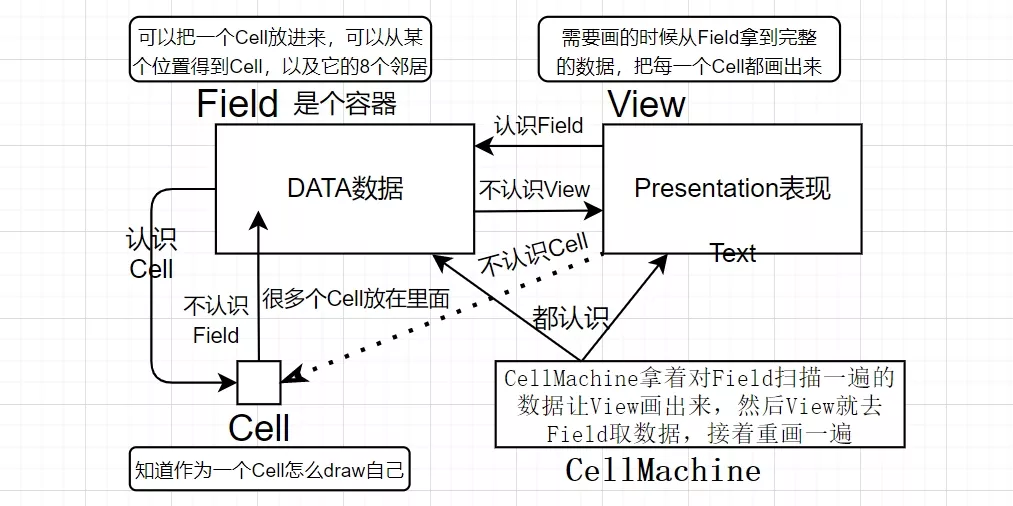
Field只需要管好数据以及提供数据
View只管拿到数据之后按数据把整个网格都重新画一遍
而Cell只管自己应该画空心还是实心,Field要就提供给它
不去精心设计哪个局部需要更新,需要更新就整个重画
这样简化了程序逻辑,是在计算机运算速度提高的基础上实现的
数据与表现分离
程序的业务逻辑与表现无关
-表现可以是图形的也可以是文本的
-表现可以是当地的也可以是远程的
需要不同表现,那就用不同表现的代码去取数据,然后表现出来
责任驱动的设计
将程序要实现的功能分配到合适的类/对象中去是设计中非常重要的一环
将功能拆分成很多个部分,每个部分只做自己擅长做的、简单的事
网格化
图形界面本身有更高的解析度,但是将画面网格化以后,数据就更容易处理了
无需关心x、y轴坐标,只需知道要操作的对象在第几行第几列
狐狸和兔子
细胞自动机是细胞在一个网格上,每个细胞都有两种状态
现在要模拟一个有狐狸和兔子的农场:
·狐狸和兔子都有年龄,且有规律增加
·当年龄到了一定的上限就会自然死亡
·狐狸可以随机决定在周围的兔子中吃一个,吃了后年龄上限会提高
·狐狸和兔子可以随机决定生一个小的,放在旁边的空的格子里
·如果不吃也不生,狐狸和兔子可以随机决定向旁边空的格子移一步
这比只有细胞,细胞只有两种状态要复杂得多
源码
这个没注释,原理和细胞自动机差不多
package cell;
import java.awt.Graphics;
public interface Cell {  void draw(Graphics g, int x, int y, int size);}
package animal;
import java.util.ArrayList;import field.Location;
public abstract class Animal {
private int ageLimit; private int breedableAge; private int age; private boolean isAlive = true;
public Animal(int ageLimit, int breedableAge) { this.ageLimit = ageLimit; this.breedableAge = breedableAge; }
protected int getAge() { return age; }
protected double getAgePercent() { return (double) age / ageLimit; }
public abstract Animal breed();
public void grow() { age++; if (age >= ageLimit) { die(); } }
public void die() { isAlive = false; }
public boolean isAlive() { return isAlive; }
public boolean isBreedable() { return age >= breedableAge; }
public Location move(Location[] freeAdj) { Location ret = null; if (freeAdj.length > 0 && Math.random() < 0.02) { ret = freeAdj[(int) (Math.random() * freeAdj.length)]; } return ret; }
@Override public String toString() { return "" + age + ":" + (isAlive ? "live" : "dead"); }
public Animal feed(ArrayList<Animal> neighbour) { return null; }
protected void longerLife(int inc) { ageLimit += inc; }}package animal;
import java.awt.Color;import java.awt.Graphics;import java.util.ArrayList;
import cell.Cell;
public class Fox extends Animal implements Cell {
public Fox() { super(20, 4); }
@Override public void draw(Graphics g, int x, int y, int size) { int alpha = (int) ((1 - getAgePercent()) * 255); g.setColor(new Color(0, 0, 0, alpha));// (int)((20-getAge())/20.0*255))); g.fillRect(x, y, size, size); }
@Override public Animal breed() { Animal ret = null; if (isBreedable() && Math.random() < 0.05) { ret = new Fox(); } return ret; }
@Override public String toString() { return "Fox:" + super.toString(); }
@Override public Animal feed(ArrayList<Animal> neighbour) { Animal ret = null; if (Math.random() < 0.2) { ret = neighbour.get((int) (Math.random() * neighbour.size())); longerLife(2); } return ret; }}package animal;
import java.awt.Color;import java.awt.Graphics;import cell.Cell;
public class Rabbit extends Animal implements Cell {
public Rabbit() { super(10, 2); }
@Override public void draw(Graphics g, int x, int y, int size) { int alpha = (int) ((1 - getAgePercent()) * 255); g.setColor(new Color(255, 0, 0, alpha)); g.fillRect(x, y, size, size); }
@Override public Animal breed() { Animal ret = null; if (isBreedable() && Math.random() < 0.12) { ret = new Rabbit(); } return ret; }
@Override public String toString() { return "Rabbit:" + super.toString(); }}package field;
import java.util.ArrayList;import cell.Cell;
public class Field {
private static final Location[] adjacent = { new Location(-1, -1), new Location(-1, 0), new Location(-1, 1), new Location(0, -1), new Location(0, 0), new Location(0, 1), new Location(1, -1), new Location(1, 0), new Location(1, 1) };
private int width; private int height; private Cell[][] field;
public Field(int width, int height) { this.width = width; this.height = height; field = new Cell[height][width]; }
public int getWidth() { return width; } public int getHeight() { return height; } public Cell place(int row, int col, Cell o) { Cell ret = field[row][col]; field[row][col] = o; return ret; }
public Cell get(int row, int col) { return field[row][col]; }
public Cell[] getNeighbour(int row, int col) { ArrayList<Cell> list = new ArrayList<Cell>(); for (int i = -1; i < 2; i++) { for (int j = -1; j < 2; j++) { int r = row + i; int c = col + j; if (r > -1 && r < height && c > -1 && c < width && !(r == row && c == col)) { list.add(field[r][c]); } } } return list.toArray(new Cell[list.size()]); }
public Location[] getFreeNeighbour(int row, int col) { ArrayList<Location> list = new ArrayList<Location>(); for (Location loc : adjacent) { int r = row + loc.getRow(); int c = col + loc.getCol(); if (r > -1 && r < height && c > -1 && c < width && field[r][c] == null) { list.add(new Location(r, c)); } } return list.toArray(new Location[list.size()]); }
public boolean placeRandomAdj(int row, int col, Cell cell) { boolean ret = false; Location[] freeAdj = getFreeNeighbour(row, col); if (freeAdj.length > 0) { int idx = (int) (Math.random() * freeAdj.length); field[freeAdj[idx].getRow()][freeAdj[idx].getCol()] = cell; ret = true; } return ret; }
public Cell remove(int row, int col) { Cell ret = field[row][col]; field[row][col] = null; return ret; }
public void remove(Cell cell) { for (int row = 0; row < height; row++) { for (int col = 0; col < width; col++) { if (field[row][col] == cell) { field[row][col] = null; break; } } } }
public void clear() { for (int i = 0; i < height; i++) { for (int j = 0; j < width; j++) { field[i][j] = null; } } }
public void move(int row, int col, Location loc) { field[loc.getRow()][loc.getCol()] = field[row][col]; remove(row, col); }}package field;
public class Location {
private int row; private int col;
public Location(int row, int col) { this.row = row; this.col = col; }
public int getRow() { return row; }
public int getCol() { return col; }}package field;
import java.awt.Color;import java.awt.Dimension;import java.awt.Graphics;import javax.swing.JPanel;import cell.Cell;
public class View extends JPanel { private static final long serialVersionUID = -2417015700213488315L; private static final int GRID_SIZE = 16; private Field theField; public View(Field field) { theField = field; }
@Override public void paint(Graphics g) { super.paint(g); g.setColor(Color.GRAY); for (int row = 0; row < theField.getHeight(); row++) { g.drawLine(0, row * GRID_SIZE, theField.getWidth() * GRID_SIZE, row * GRID_SIZE); } for (int col = 0; col < theField.getWidth(); col++) { g.drawLine(col * GRID_SIZE, 0, col * GRID_SIZE, theField.getHeight() * GRID_SIZE); } for (int row = 0; row < theField.getHeight(); row++) { for (int col = 0; col < theField.getWidth(); col++) { Cell cell = theField.get(row, col); if (cell != null) { cell.draw(g, col * GRID_SIZE, row * GRID_SIZE, GRID_SIZE); } } } }
@Override public Dimension getPreferredSize() { return new Dimension(theField.getWidth() * GRID_SIZE + 1, theField.getHeight() * GRID_SIZE + 1); }}package foxnrabbit;
import java.util.ArrayList;import javax.swing.JFrame;import animal.Animal;import animal.Fox;import animal.Rabbit;import cell.Cell;import field.Field;import field.Location;import field.View;
public class FoxAndRabbit {
private Field theField; private View theView;
public FoxAndRabbit(int size) { theField = new Field(size, size); for (int row = 0; row < theField.getHeight(); row++) { for (int col = 0; col < theField.getWidth(); col++) { double probability = Math.random(); if (probability < 0.05) { theField.place(row, col, new Fox()); } else if (probability < 0.15) { theField.place(row, col, new Rabbit()); } } }
theView = new View(theField); JFrame frame = new JFrame(); frame.setDefaultCloseOperation(JFrame.EXIT_ON_CLOSE); frame.setResizable(false); frame.setTitle("Cells"); frame.add(theView); frame.pack(); frame.setVisible(true); }
public void start(int steps) { for (int i = 0; i < steps; i++) { step(); theView.repaint(); try { Thread.sleep(200); } catch (InterruptedException e) { e.printStackTrace(); } } }
public void step() { for (int row = 0; row < theField.getHeight(); row++) { for (int col = 0; col < theField.getWidth(); col++) { Cell cell = theField.get(row, col); if (cell != null) { Animal animal = (Animal) cell; animal.grow(); if (animal.isAlive()) { Location loc = animal.move(theField.getFreeNeighbour(row, col)); if (loc != null) { theField.move(row, col, loc); } // eat // animal.eat(theField); Cell[] neighbour = theField.getNeighbour(row, col); ArrayList<Animal> listRabbit = new ArrayList<Animal>(); for (Cell an : neighbour) { if (an instanceof Rabbit) { listRabbit.add((Rabbit) an); } } if (!listRabbit.isEmpty()) { Animal fed = animal.feed(listRabbit); if (fed != null) { theField.remove((Cell) fed); } } // breed Animal baby = animal.breed(); if (baby != null) { theField.placeRandomAdj(row, col, (Cell) baby); } } else { theField.remove(row, col); } } } } }
public static void main(String[] args) { FoxAndRabbit fab = new FoxAndRabbit(50); fab.start(500); }}项目结构及分析
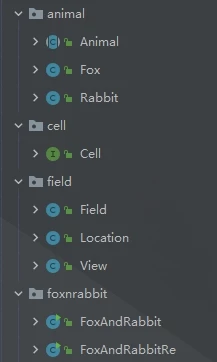
在英文中Cell有两种意思,格子、细胞
在刚刚到细胞自动机中,Cell类表达细胞,或者没有细胞的空格子,这很合理
狐狸和兔子类有很多相似的属性和动作,所以它们应该有一个父类
但这个父类不应该是Cell,Cell在这个程序中应该表达有东西或没东西的格子才合理
所以这个父类应该是Animal
现在类之间关系是这样的:
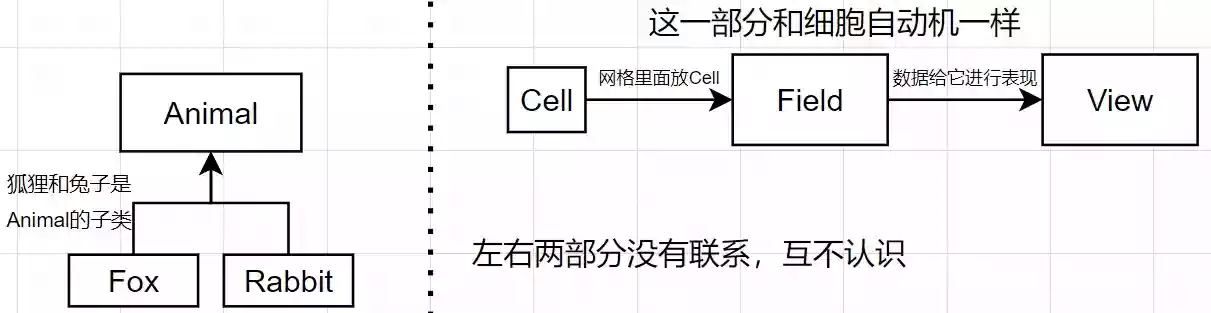
在细胞自动机中我们通过place(r,c,cell)将Cell放进网格中
但现在Fox、Rabbit和Cell没有联系,无法将它们放进网格中
如果按照之前的思路,Fox、Rabbit应该也是Cell的子类,但多继承是不被允许的(除了C++)
如果让Animal从Cell继承,这在语意上是模糊的,动物不应该是一种格子(虽然这样做能实现)
接口
接口是纯抽象类
·所有的成员函数都是抽象函数
·所有的成员变量都是public static final
类表达一个具体的东西,而接口表达一种概念、一种规范
接口规定了长什么样,但是不管里面有什么
我们可以将Cell类改造成接口:
import java.awt.Graphics;public interface Cell { void draw(Graphics g, int x, int y, int size);}Cell现在的作用:所有实现了Cell这个接口的类,都应该有draw这个方法
在这个程序中,只要实现了这个方法的类的对象,都可以直接放到Field中
为什么Cell接口只要求实现draw方法?
因为将来View只需要拿Cell去draw,所以只需要要求放到Field里的类的对象实现draw方法
现在类之间关系是这样的:
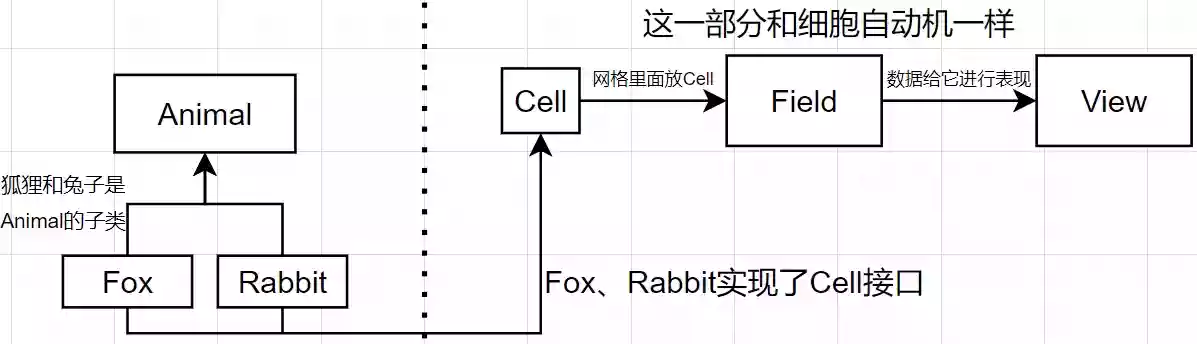
现在Fox、Rabbit的对象都可以放进Field里(Field需要一个Cell,而Fox、Rabbit都实现了Cell)
implements
用关键字implements让类实现接口
public class Fox extends Animal implements Cell{ //Fox是一种Animal,它实现了Cell}在Field的place方法中,place需要一个Cell类的对象
Cell本身是一个接口,它本身是抽象的,不可能有对象
但所有实现了Cell接口的对象都可以交给Cell对象的管理者
public Cell place(int row, int col, Cell o) { Cell ret = field[row][col]; field[row][col] = o; return ret; }当Fox实现Cell后,就必须重写Cell中的方法
把draw方法实际地做出来
@Override public void draw(Graphics g, int x, int y, int size) { int alpha = (int) ((1 - getAgePercent()) * 255); g.setColor(new Color(0, 0, 0, alpha)); g.fillRect(x, y, size, size); }类用extends,接口用implements
类可以实现很多接口
接口可以继承接口,但不能继承类
接口不能实现接口
interface
声明一个接口
public interface Cell{//接口}public class Cell{//类}interface是一种特殊的class,它替代掉了class
面向接口的编程方式
在上面的程序中,Field需要一个能draw的类的对象,然后Field提供了一个Cell接口,所有实现了这个接口的东西都可以交给Field,而它不关心这个东西是什么,只需要符合接口即可
设计程序时先定义接口,再实现类
任何需要在函数间传入传出的一定是接口而不是具体的类
是Java成功的关键之一,因为极适合多人同时写一个大程序:每个人只需要用接口去提出要求,其他人根据借口实现具体的类
也是Java被批评的要点之一,因为代码量膨胀起来很快,显得程序十分臃肿
增加一个按钮
在狐狸与兔子程序的图形界面中增加一个按钮,按一下执行一步
在FoxAndRabbit.java中,这么一段代码生成了一个窗口
theView = new View(theField);JFrame frame = new JFrame();frame.setDefaultCloseOperation(JFrame.EXIT_ON_CLOSE);frame.setResizable(false);frame.setTitle("Cells");frame.add(theView);frame.pack();frame.setVisible(true);首先要在窗口中增加一个按钮
theView = new View(theField);JFrame frame = new JFrame();frame.setDefaultCloseOperation(JFrame.EXIT_ON_CLOSE);frame.setResizable(false);frame.setTitle("Cells");frame.add(theView);//有一个类叫JButton,做一个叫btnstep的对象JButton btnstep =new JButton("单步");//把这个按钮加到窗口中frame.add(btnstep);frame.pack();frame.setVisible(true);运行一下

整个窗口只剩下了我们加进去的这个按钮,解决这个问题我们需要了解Swing
评论